Working with Google Antigravity: Moving from Autocomplete to Multi-Agent Delegation
Moving beyond sidebar chat boxes to explore how unified memory, parallel subagent swarms, and plan-first execution elevate developers into true AI-native Solution Architects.
📌 AI Architecture Series (Part 2 of 3)
This post explores the autonomous AI agent architecture powering Google Antigravity.
To see how you can create an autonomous content pipeline, check out part 1: Architecting an Autonomous Content Pipeline: From Video Streams to Drupal Nodes via Drush.
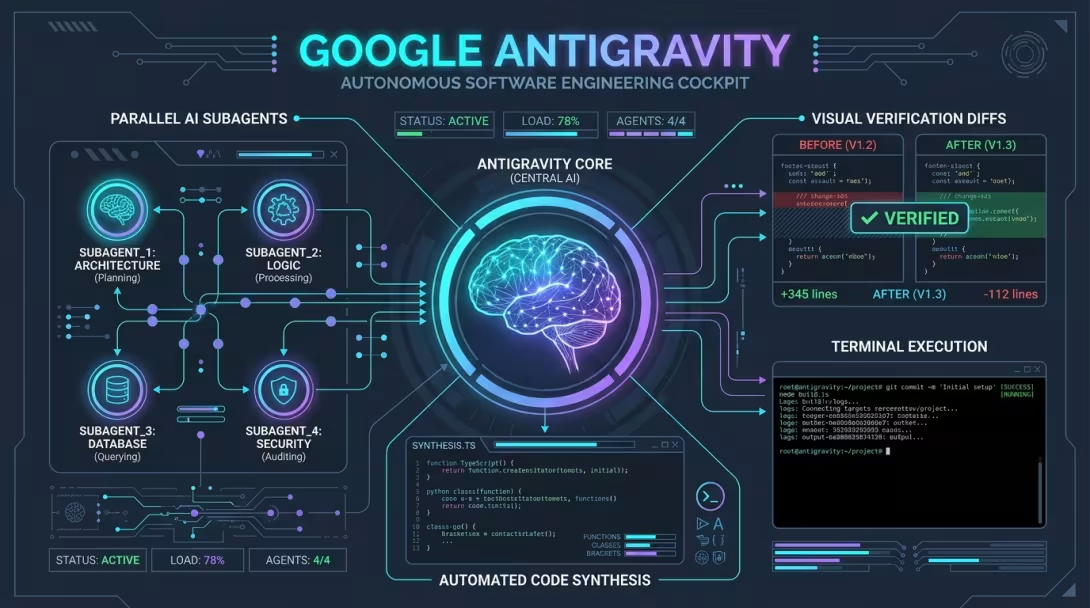
📸 System Architecture & Visual Overview
💡 The Paradigm Shift: From Autocomplete to Agentic Delegation
Most developers today are familiar with AI copilots that operate as interactive spell-checkers—a chat box sitting in the sidebar suggesting the next line of code or offering quick function completions. While helpful, this paradigm leaves the developer acting as the manual loop driver: typing, copying snippets, running terminal commands, inspecting error stack traces, and stitching files together line by line.
Google Antigravity is fundamentally different.
Designed by the Google DeepMind team working on Advanced Agentic Coding, Antigravity represents a leap into AI-native autonomous agent workspace orchestration. Instead of waiting for keystroke prompts, Antigravity functions as a pair-programming system capable of taking high-level architectural goals and executing complex end-to-end engineering tasks.
⚙️ The Core Architecture of Antigravity
What allows an autonomous agent environment like Antigravity to achieve unprecedented engineering velocity? It comes down to four architectural pillars:
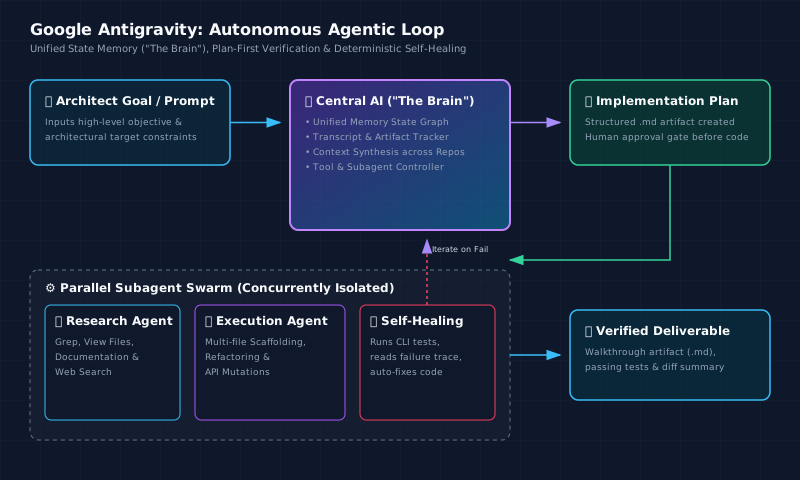
Diagram: End-to-end execution loop showing unified memory state, plan-first verification, parallel subagents, and self-healing test loops.
1. The Unified Memory State Graph ("The Brain")
In standard copilot setups, context is ephemeral—lost between chat sessions or restricted to the active file tab. Antigravity maintains a persistent, unified state graph (referenced in system execution logs as "the brain"). It holds real-time awareness across:- Conversation Transcripts: Complete trajectory logs tracking every intent, decision, and tool payload.
- Workspace State: Multi-repository file trees, open buffers, and git symbols.
- Execution History: Background sub-shell terminal outputs, test suite assertions, and DOM snapshots.
- Living Artifacts: Persistent structured markdown documents (
implementation_plan.md,walkthrough.md) that evolve as work progresses.
2. Multi-Agent Delegation & Subagent Swarms
Complex engineering tasks are rarely linear. Antigravity handles complexity by spawning specialized subagents that run concurrently in isolated background contexts:- Research Agents: Survey repository structures, grep codebase patterns, inspect documentation, and extract relevant API contracts without cluttering the main context.
- Execution Agents: Apply multi-file edits, scaffold cross-package schemas, and refactor code modules in a single coordinated pass.
- Verification & Testing Agents: Execute test runners in background sub-shells, parse stderr stack traces, capture visual DOM diffs, and report validation results.
3. Adaptive Plan-First Verification
Before executing code changes, Antigravity exercises judgment to evaluate task complexity. For non-trivial work—such as multi-file scaffolding, structural refactoring, or architectural modifications—it enforces an adaptive plan-first workflow. It generates a structuredimplementation_plan.md artifact outlining proposed file changes, design trade-offs, open questions, and verification steps for human review before execution begins. For simple investigatory questions or minor follow-ups, it skips formal planning to preserve frictionless velocity.
💡 Practical Example (Illustrative Sidebar)
To see how an
implementation_plan.mdartifact functions during a complex architectural task, consider an example where Antigravity was asked to scale a PySpark notebook environment on Kubernetes. Before executing any manifest changes, it generated a plan artifact mapping dynamic pod allocation and port-forwarding steps:Diagram: Example PySpark Driver Pod, K8s API Server, and dynamic Executor Pod scaling architecture generated inside implementation_plan.md.
This illustrative plan allowed the human architect to review and approve K8s manifest deployments and Docker build strategies prior to executing cluster changes.
4. Deterministic Self-Healing & Verification Artifacts (Run → Fail → Fix)
When a build or unit test breaks during execution, traditional copilots rely on the developer to copy-paste error logs back into chat. Antigravity operates in a deterministic feedback loop: 1. It executes the test suite in a background sub-shell. 2. If tests fail, it intercepts the traceback and identifies the root cause. 3. It modifies the code to fix the underlying failure and re-runs the tests. 4. It compiles a verifiedwalkthrough.md (and optional test_report.md) artifact proving green build and test status.
💡 Practical Example (Illustrative Sidebar)
To see how
walkthrough.mdand verification artifacts operate in practice, consider a full-stack audit of a Nintendo Switch NSP Tracker application. Antigravity executed static linting, production bundling, catalog counts, and live API checks—compiling a structured proof report before closing the turn:This illustrative walkthrough artifact gave the developer empirical proof that static types, production bundles, and live endpoints were green before concluding the turn.
Test Stage Command Executed Result Details Type Check npm run lint(tsc --noEmit)PASS 0 compilation errors across TypeScript source Production Build npm run buildPASS Transformed 2,098 modules into static assets & server bundle Catalog Audit node scriptPASS Validated 12,926Nintendo Switch game records indexedAPI Response GET /api/games/search-ziperto?q=marioPASS 200 OK with 29 matching game objects returned
🚀 The Six Core Capabilities of Autonomous Agents
Evaluating Antigravity across real-world software projects highlights six capability dimensions that define the state-of-the-art in agentic coding:
| Capability Dimension | How Google Antigravity Operates | Impact on Developer Velocity |
|---|---|---|
| Autonomous Multi-Step Planning | Native architectural roadmap generation (implementation_plan.md) with step-by-step verification prior to execution. |
Eliminates guesswork; enforces plan-first review before committing changes. |
| Multi-File Scaffolding & Refactoring | Scaffolds cross-package schemas, APIs, and data models simultaneously in a single pass. | Reduces multi-file boilerplate refactoring time from hours to seconds. |
| Deterministic Self-Healing | Spawns background sub-shells, executes test suites, reads stack traces, and iterates until green. | Replaces manual debugging loops with automated, verified fix iterations. |
| Artifact & UI Verification | Captures DOM snapshots, visual validation diffs, and structured walkthroughs (walkthrough.md). |
Provides empirical visual and textual proof of working software. |
| Context Synthesis | Deep context pulling across documentation, local codebases, external APIs, and issue trackers. | Eliminates documentation hunt-and-peck across fragmented enterprise tools. |
| Model Context Protocol (MCP) Chaining | Deeply woven multi-agent tool calling via standard JSON-RPC protocols across parallel subtasks. | Enables autonomous integration with external databases, CI/CD telemetry, and tools. |
📊 Industry Landscape: Comparing Autonomous Agents & Copilot Tooling
To evaluate Google Antigravity objectively without bias, we must examine how it fits into the broader ecosystem of AI developer tools. The landscape spans three distinct architectural paradigms:
1. Inline Autocomplete & Chat Assistants: Focused on localized code completion and single-file Q&A (e.g., GitHub Copilot, Amazon Q / Kiro).
2. IDE-Integrated Agentic Editors: Focused on deep codebase indexing (@workspace) and multi-file editing within the local editor (e.g., Cursor, Cline).
3. Autonomous Agent Workspaces: Focused on full task delegation, plan-first verification, multi-agent orchestration, and background self-healing (e.g., Google Antigravity, Cognition Devin).
Below is an objective feature comparison across the leading platforms:
| Feature & Architectural Dimension | Google Antigravity | Cognition Devin | Cursor / Cline | GitHub Copilot | Amazon Q / Kiro* |
|---|---|---|---|---|---|
| Primary Architectural Paradigm | AI-Native Agentic Workspace (Local/Hybrid) | Cloud Autonomous Engineer (Isolated VM) | IDE-Native Multi-File Editor (VS Code Fork) | Enterprise Developer Copilot (VS Code / GitHub) | Cloud & AWS Ecosystem Developer Assistant |
| Multi-Agent Orchestration | Native Swarms: Spawns parallel subagents (Research, Scaffolding, Verification). | Single Cloud Agent: Executes sequential actions in a cloud browser/VM sandbox. | Single-Threaded: Chat loop drives execution directly in the active editor. | Bounded Agent Loop: Operates step-by-step with developer prompt triggers. | Single-Threaded: Interactive chat and inline code generation. |
| State Memory ("The Brain") | Unified State Graph: Tracks transcripts, workspace buffers, CLI logs & DOM diffs. | Cloud VM Memory: Persists state within an ephemeral cloud container session. | Local Workspace Index: RAG vector embeddings over local git files (@workspace). |
Repository Indexing: GitHub repository search & local workspace context. | AWS Context Index: Repo indexing & AWS service knowledge graph. |
| Planning & Verification | Plan-First Artifacts: Mandates implementation_plan.md approval before code changes. |
Step-by-Step Task Plan: Generates checklist steps inside the cloud browser interface. | Prompt-Driven: User can prompt for a plan, but execution is inline and direct. | Copilot Workspace Plan: Generates structured markdown specification plans. | Task Breakdown: Generates high-level step summaries for code transformations. |
| Deterministic Self-Healing | Background Sub-Shell: Runs CLI tests, intercepts stderr, and iterates auto-fixes. | Cloud Terminal Loop: Runs shell commands in VM, detects errors, and re-applies code. | Manual Terminal Trigger: Developer pastes terminal errors back into chat. | Terminal Fix Suggestions: Recommends fix commands for developer execution. | Build Error Analysis: Recommends code fixes for compilation failures. |
| Enterprise Security & Policy Controls | Granular MCP Allow/Block Policy: Sandbox permissions & read-only tool gating. | Cloud Sandbox: Isolated VM container execution outside corporate perimeters. | Local IDE Control: Runs under developer user permissions locally. | Enterprise Admin Policy: Zero Data Retention (ZDR), IP filtering, enterprise admin gating. | AWS IAM & VPC Controls: Enterprise AWS security boundaries & IAM policies. |
💡 Key Takeaway from the Landscape:
- Cursor & Cline excel at rapid, developer-steered local code refactoring where the developer actively guides every prompt.
- Devin excels at asynchronous, cloud-hosted task delegation where an issue is dispatched to a remote VM.
- GitHub Copilot & Amazon Q / Kiro offer unmatched enterprise administrative governance, corporate compliance perimeters, and repository access control.
- Google Antigravity bridges local developer control with true autonomous delegation: providing multi-agent parallel execution, a unified persistent state graph, and deterministic self-healing loops right within your workspace.
🏛️ From Coder to Architect: The Future of Engineering
The true power of Google Antigravity isn't just speed—it's elevation.
When AI handles code scaffolding, deterministic test verification, and documentation synthesis, the developer's role shifts upwards. Developers spend less time acting as human syntax translators and more time operating as Solution Architects: defining target state designs, setting security boundaries, evaluating trade-offs, and steering product vision.
🔗 What Comes Next?
While autonomous agent platforms like Google Antigravity show us the ultimate horizon of engineering velocity, how do we bring these agentic capabilities into regulated corporate environments (like enterprise banking) where strict security policies, CISO approvals, and data perimeters apply?
Stay tuned for part 3 of this series where we will deep dive into how to architect an agentic workflow for regulated enterprise environments.
Do you have experience working with autonomous coding agents? How do you see agentic workflows shaping the future of software architecture? Share your thoughts below!