Architecting an Autonomous Content Pipeline: From Video Streams to Drupal Nodes via Drush
Most AI "blog generators" available today are disappointingly superficial. They take a 5-word text prompt, query a language model, and spit out unstructured wall-of-text paragraphs into a text box. In real-world web publishing and developer workflows, however, generating text is only 20% of the work.
A production-grade ingestion and publishing pipeline requires:
1. Media Ingestion & Asset Capture: Pulling raw streams, extracting key frames/screenshots from video feeds, and sourcing web references.
2. Schema & Frontmatter Normalization: Enforcing strict metadata formats (slugs, dates, tags, summaries, featured image references).
3. Attribution & Legal Compliance: Generating mandatory credit callouts and copyright citations.
4. Local Staging & Validation: Testing rendering and node creation inside isolated local environments (e.g., Docker / DDEV).
5. CMS Integration: Programmatically importing structured content directly into enterprise Content Management Systems (CMS) like Drupal or WordPress via CLI tools.
To bridge this gap, I built an end-to-end agentic workflow skill—combining Python stream processing, structured Markdown frontmatter schemas, and Drush CLI automation. Here is an inside look at how the architecture works.
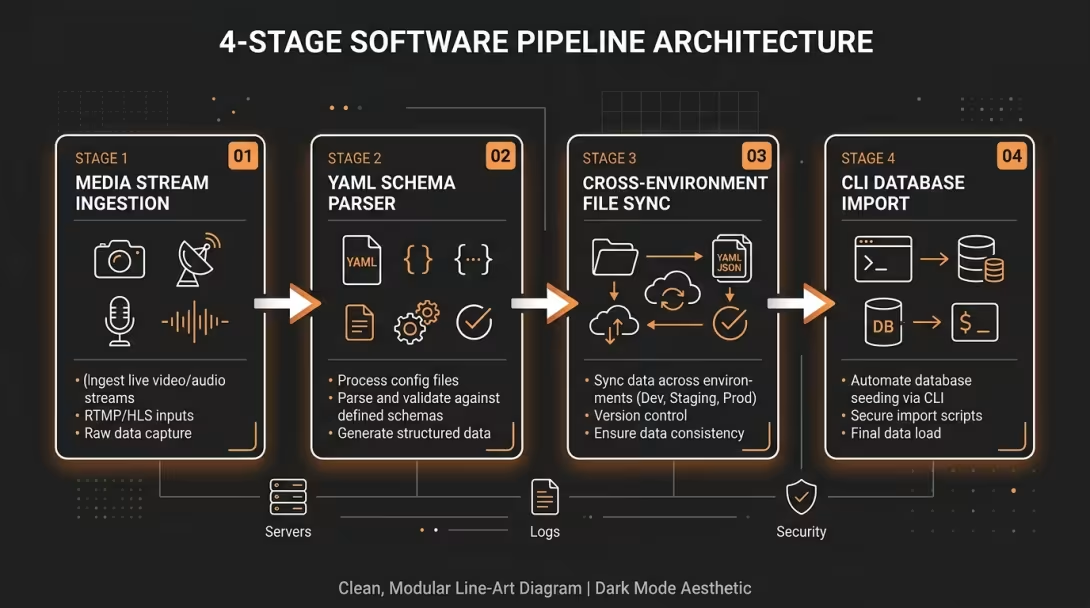
📐 System Architecture Overview
The autonomous agent operates across four distinct pipeline stages:
Stage 1: Stream Inspection & Exact-Timestamp Frame Extraction
Relying on AI models to generate descriptions of video content without visual context leads to generic summaries. Furthermore, manually taking screenshots from long technical videos breaks flow.
Instead of downloading multi-gigabyte video files to disk, the agent uses yt-dlp to inspect the raw MP4 stream URL directly and feeds target timestamps into ffmpeg to capture crystal-clear PNG/JPG frames on the fly.
Python Stream Capture Utility
import subprocess
import os

def capture_video_frame(video_url: str, timestamp: str, output_path: str):
    """
    Extracts a single high-quality frame from a live YouTube video stream
    at a specific timestamp without downloading the entire video file.
    """
    # 1. Fetch direct video stream URL
    cmd_get_stream = [
        'yt-dlp', '--no-check-certificates', '-g',
        '-f', 'bestvideo[ext=mp4]/bestvideo/best',
        video_url
    ]
    stream_url = subprocess.check_output(cmd_get_stream, text=True).strip().split('\n')[0]

    # 2. Seek & extract 1 frame at exact timestamp using ffmpeg
    ffmpeg_cmd = [
        'ffmpeg', '-ss', timestamp, '-i', stream_url,
        '-frames:v', '1', '-q:v', '2', output_path, '-y'
    ]
    subprocess.run(ffmpeg_cmd, check=True, stdout=subprocess.DEVNULL, stderr=subprocess.DEVNULL)
    print(f"[SUCCESS] Extracted frame at {timestamp} -> {output_path}")
This script allows the agent to read video transcripts, identify key visual moments (e.g. hardware benchmarks, slide titles, demo moments), and programmatically capture exact reference images saved directly to content/posts/img/<slug>_<timestamp>.jpg.
Stage 2: Enforcing Structured Markdown & YAML Frontmatter Schemas
To ensure every article meets editorial standards before reaching the CMS, the agent drafts content into Markdown files with a mandatory YAML frontmatter schema.
Standardized Article Structure
---
title: "Article Title Here"
slug: "article-title-slug"
date: "2026-08-22"
summary: "A concise 1-2 sentence teaser/summary of the post."
category: "🤖 Assistant Labs & Workflows"
tags:
  - Technology
  - Open Source
image: "img/featured-cover.jpg"
image_credit: "Photo by Author / Source"
status: draft
---

# Article Title Here

### Original Source & Credits
- **Channel**: [Author / Channel Name](https://youtube.com/...)
- **Source Link**: [Original Video / Article](https://youtube.com/watch?v=...)
- **Publication Date**: Month DD, YYYY

---

## TL;DR
- **Key Takeaway 1**: Concise explanation of major takeaway.
- **Key Takeaway 2**: Second major insight from source material.
- **Key Takeaway 3**: Technical implication or recommendation.

---

## Detailed Technical Analysis
[Body text featuring embedded code snippets, bullet lists, and captured frame images...]
Key Architectural Rules:
- Top Source Callout: Attribution is rendered at the top of the body inside a styled notice box, ensuring legal & copyright compliance.
- Executive Summary Box: A mandatory TL;DR section gives high-intent readers immediate value.
- Separation of Featured Media: The main cover image is declared strictly in frontmatter (
image:) so the CMS rendering engine can place it dynamically without causing body duplicates.
Stage 3: Cross-Environment File Synchronization
In modern web development setups, developer environments often span multiple layers—such as Windows host filesystems, Linux/WSL environments, and Docker containers running DDEV.
The agent automates multi-stage asset replication so files remain identical across repositories:
# 1. Copy generated posts & extracted images to Drupal project content directory
$CONTENT_REPO = "$HOME/workspace/endegraaf-content"
$DRUPAL_REPO  = "$HOME/workspace/endegraaf-drupal-01"

New-Item -ItemType Directory -Force -Path "$DRUPAL_REPO/content/posts/img"
Copy-Item "$CONTENT_REPO/posts/*" "$DRUPAL_REPO/content/posts/" -Recurse -Force

# 2. Mirror workspace files into Linux WSL DDEV workspace
wsl bash -c "cp -r ~/workspace/endegraaf-drupal-01/content ~/drupal/"
Stage 4: Programmatic Node Import via Drush PHP Scripts
The final link in the chain is programmatically instantiating Drupal nodes. Rather than forcing a human or agent to click through the web UI (/node/add/article), the agent invokes a custom PHP script via Drush inside the DDEV container.
Drush Import Command Executed by Agent:
# Execute local staging import via DDEV
wsl bash -c "cd ~/drupal && ddev drush php:script scripts/import-markdown.php -- content/posts/architecting-autonomous-content-pipeline-drupal-drush.md"
Underlying import-markdown.php Logic:
<?php
use Drupal\node\Entity\Node;
use Drupal\file\Entity\File;
use Symfony\Component\Yaml\Yaml;

// 1. Parse CLI arguments & file contents
$file_path = $extra[0] ?? NULL;
$content = file_get_contents($file_path);

// 2. Extract YAML Frontmatter & Body
preg_match('/^---\s*\n(.*?)\n---\s*\n(.*)/s', $content, $matches);
$frontmatter = Yaml::parse($matches[1]);
$body_markdown = $matches[2];

// 3. Create or update Drupal Node programmatically
$node = Node::create([
  'type' => 'article',
  'title' => $frontmatter['title'],
  'body' => [
    'value' => $body_markdown,
    'format' => 'full_html',
  ],
  'status' => ($frontmatter['status'] === 'published') ? 1 : 0,
]);

$node->setOwnerId(1);
$node->save();

echo "Successfully imported Node ID: " . $node->id() . " [Status: " . $frontmatter['status'] . "]\n";
Key Benefits of an Agent-Driven CMS Pipeline
1. Zero Context Switching: The author goes from a video URL or research topic directly to a fully formatted, staged draft in local Drupal without manually opening browser tabs or copying text.
2. Built-in Quality Control: Setting status: draft in frontmatter guarantees that every node is rendered and reviewed in local DDEV (http://drupal.ddev.site) before any live deployment command is executed.
3. Framework Agnostic Pattern: While this implementation targets Drupal via Drush, the exact same 4-stage pattern applies to enterprise microservices, API gateways, WordPress (wp-cli), Ghost, Strapi, or SSGs (Hugo / Astro / Next.js).
Summary Blueprint for Software Engineers & Architects
By combining AI agent reasoning with robust CLI tooling (yt-dlp, ffmpeg, drush), we transform AI from a simple text-generation toy into a production-ready publishing assistant.
Separating AI agent data extraction from deterministic database execution ensures that your system gains the velocity of AI automation while preserving 100% data integrity, auditability, and schema validation across developer environments.