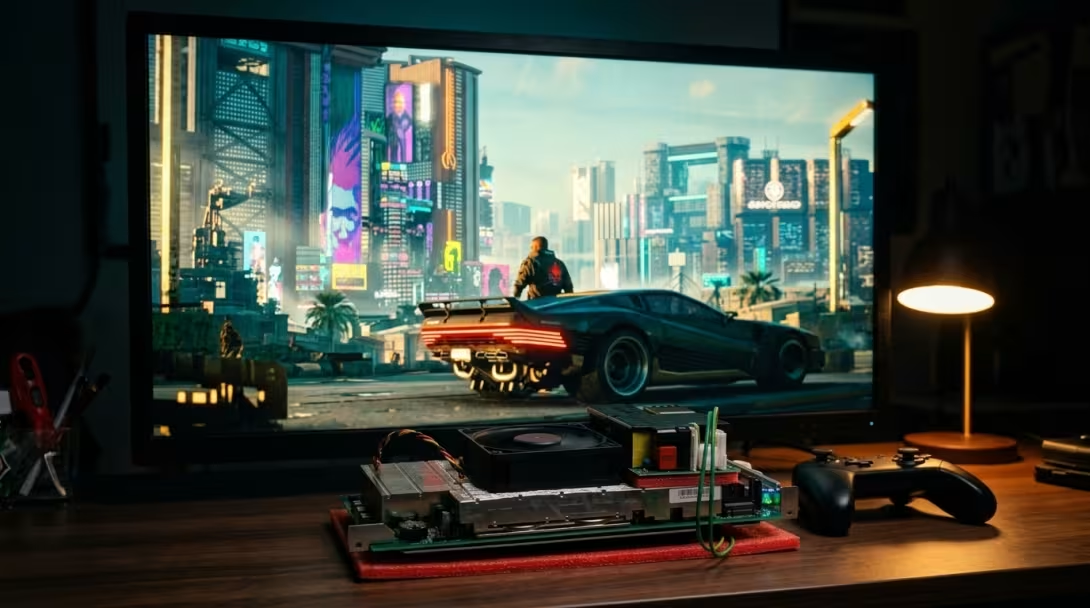
Night City on Salvaged PS5 Silicon: A Retrospective on Running Cyberpunk 2077 on the AMD BC-250
Original Source & Credits
- Hardware Platform: ASRock AMD BC-250 (Cyan Skillfish / PlayStation 5 Oberon APU, 32 Active CUs, 16 GB Unified GDDR6)
- Operating System: Bazzite Linux 44 (
7.2.8-ogcgaming kernel, Mesa RADVGFX1013) - Launcher & Runtime: Heroic Games Launcher (Flatpak
com.heroicgameslauncher.hgl) + Legendary (Ginger/ Patch2.31_hotfix) +GE-Proton11-7-x86_64
TL;DR
- The Hardware Foundation: Getting a demanding modern DX12 open-world title like Cyberpunk 2077 to run on a salvaged crypto-mining board starts with the silicon baseline: unlocking 32 healthy Compute Units (
0x0f,0x0f,0x0f,0x0fwhile keeping defectiveWGP4masked off), locking the GPU ceiling to 1500 MHz @ 900 mV for the 12V Mean Well open-frame PSU, and pairing ZRAM with a 16 GB Btrfs No-COW NVMe swapfile to back up the 6.6 GB VRAM / 9.4 GB system RAM split. - Bypassing the Crashing CDPR Launcher (
--launcher-skip): UnderGE-Proton11-7, CD Projekt Red's Qt5-basedREDlauncher.exe(5.5.0.6) crashes withdouble free or corruption (fasttop)before the game even starts. Passing--launcher-skip(and symlinkingredprelauncher.exe -> REDprelauncher.exefor Linux case sensitivity) launchesbin\x64\Cyberpunk2077.exedirectly, whilePROTON_USE_XALIA=0prevents Proton's desktop gamepad wrapper from hijacking controller inputs. - Eliminating the 120-Second
RADV GFX1013Watchdog Hang: The BC-250's Cyan Skillfish GPU lacks full RDNA 2 ray-tracing hardware acceleration. LeavingRayTracing: trueinUserSettings.jsonstalls VKD3D-Proton shader execution at04_main_menuuntil REDEngine's 120-second watchdog assert (engineWatchdog.cpp:198) kills the process. - Dialing in the 6.6 GB Unified GDDR6 Envelope: Switching
QuickPresetsandTextureQualitytoMediumwith FSR 2 (Auto) at2560x1440Borderless Windowed and enforcing an in-game 60 FPS cap delivers smooth, crash-free runs through Night City.
1. Looking Back: From Mining E-Waste to Night City
When this project started with a bare ASRock AMD BC-250 server blade rescued from crypto-mining liquidation, the initial goal was simply to build a silent, air-cooled living room emulation console. At its heart sits AMD's semi-custom Cyan Skillfish (Oberon) APU—the same 7nm monolithic silicon manufactured for the Sony PlayStation 5, coupled to 16 GB of unified 256-bit GDDR6 memory (>400 GB/s bandwidth).
Once the hardware was stable under Bazzite Linux, a natural question followed: how far can this salvaged PS5 silicon actually be pushed with heavy modern PC games?
Getting Cyberpunk 2077 (installed via the Epic Games Store / Heroic Games Launcher) to boot and hold a steady framerate turned out to be the ultimate stress test—requiring every layer of the stack, from silicon CU masking and voltage curves down to Wine launcher wrappers and REDEngine 4 configuration files, to work in harmony.
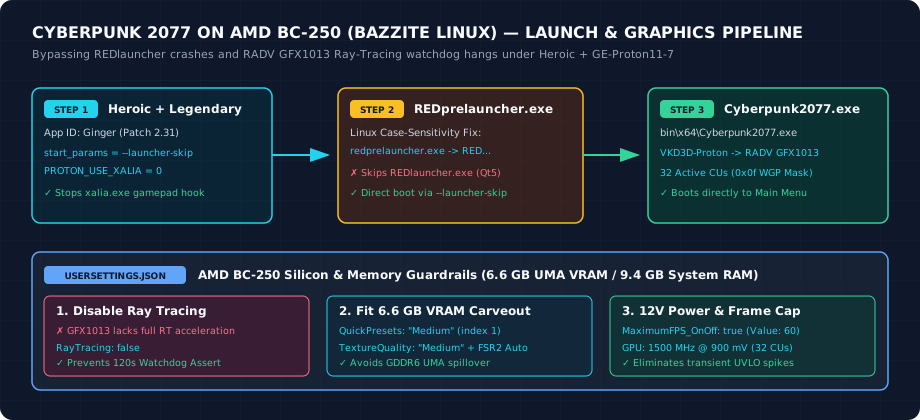
The complete hardware and software stack required to run Cyberpunk 2077 stably on the AMD BC-250 under Bazzite Linux.
2. Layer 1: The Silicon, Power, and Memory Baseline
Before troubleshooting the game itself, three hardware-level invariants on the BC-250 made running REDEngine 4 possible:
1. The 32-CU Golden Mask (0x0f,0x0f,0x0f,0x0f):
Although the physical Oberon die contains 40 Compute Units (20 WGPs) and factory BC-250 firmware routes only 24 CUs (WGP0–WGP2), unlocking all 40 CUs (0x1f) routes Vulkan shaders onto WGP4 (CUs 8–9)—the physically defective units that caused these dies to fail retail PS5 binning in the first place. Masking off WGP4 while enabling WGP0–WGP3 across all four shader arrays yields 32 healthy CUs (+33% over stock) with zero Vulkan artifacting or GPU ring resets.
2. Taming 12V Transient Spikes (1500 MHz @ 900 mV):
Because the board is powered via an open-frame Mean Well LOP-500-12 single-rail PSU through WAGO 221 lever connectors, aggressive 1850 MHz GPU boost clocks cause severe transient Vdroop under DX12 loads. Locking the SMU governor range to 500–1500 MHz @ 900 mV keeps sustained power draw cool and predictable.
3. Tiered Virtual Memory for the 16 GB GDDR6 Split:
With ~6.6 GB carved out for UMA VRAM in BIOS, Linux sees only 9.4 GB of host RAM. Pairing in-memory ZRAM (priority 100) with a 16 GB Btrfs No-COW NVMe swapfile (/var/swapfile, priority 10) gives GE-Proton and VKD3D shader caches the breathing room they need without triggering the Linux OOM killer.
3. Layer 2: Bypassing the REDlauncher.exe Crash in Heroic
With the hardware dialed in, clicking Play on Cyberpunk 2077 (Epic app ID Ginger, patch 2.31_hotfix) in Heroic Games Launcher initially resulted in a silent failure: the status flipped to "Playing" for a few seconds and immediately exited back to the library.
Inspecting Heroic's launch log (~/.var/app/com.heroicgameslauncher.hgl/.local/state/Heroic/logs/games/Ginger_legendary/launch.log) uncovered three separate issues in the pre-launch handoff:
WARNING: Executable not found: ~/Games/Heroic/Cyberpunk2077/redprelauncher.exe
...
0268:err:seh:call_seh_handlers invalid frame 000000000011E170
double free or corruption (fasttop)
1. Case-Sensitive Btrfs Lookup: Epic's manifest looks for lowercase redprelauncher.exe, whereas the binary on disk is capitalized REDprelauncher.exe.
2. Qt5 REDlauncher.exe Heap Corruption: REDprelauncher.exe spawns CD Projekt Red's REDlauncher.exe (5.5.0.6) inside the Wine prefix. Under GE-Proton11-7-x86_64, the launcher's embedded QtWebEngine crashes with double free or corruption (fasttop) before it can start Cyberpunk2077.exe.
3. Orphaned xalia.exe Controller Hook: Proton automatically starts xalia.exe to translate gamepad presses into keyboard navigation for desktop launchers. When REDlauncher.exe crashes, xalia.exe remains running and intercepts controller inputs.
What Was Done
First, we created a lowercase symlink inside the game folder so umu-launcher resolves the prelauncher binary cleanly:
ln -sf REDprelauncher.exe ~/Games/Heroic/Cyberpunk2077/redprelauncher.exeNext, we configured both Legendary and Heroic to pass --launcher-skip—which tells REDprelauncher.exe to bypass REDlauncher.exe entirely and execute bin\x64\Cyberpunk2077.exe directly—alongside PROTON_USE_XALIA=0:
- Legendary Config (
~/.var/app/com.heroicgameslauncher.hgl/config/heroic/legendaryConfig/legendary/config.ini):
  [Ginger]
  install_tags =
  start_params = --launcher-skip

  [Ginger.env]
PROTON_USE_XALIA = 0- Legendary Installed Manifest (
~/.var/app/com.heroicgameslauncher.hgl/config/heroic/legendaryConfig/legendary/installed.json):
"launch_parameters": "--launcher-skip"- Heroic Game Config (
~/.var/app/com.heroicgameslauncher.hgl/config/heroic/GamesConfig/Ginger.json):
  "enviromentOptions": [
    {
      "key": "PROTON_USE_XALIA",
      "value": "0"
    }
  ],
  "wrapperOptions": [],
  "launcherArgs": "--launcher-skip",
4. Layer 3: Solving the 120-Second RADV GFX1013 Watchdog Timeout
Once Cyberpunk2077.exe launched directly, it reached the opening splash screen (04_main_menu), froze, and crashed after exactly two minutes. Inspecting the REDEngine crash dump (bin/x64/Cyberpunk2077.exe-*.txt) revealed the culprit:
Error Reason: Assert
Expression:
Message: Watchdog timeout! (120 seconds)
File: E:\R6.Release\dev\src\common\engine\src\engineWatchdog.cpp
Line: 198

"Gpu/RayTracing/Enabled@127#TID=0":"true"
"Rendering/AsyncCompute@86487#TID=0":"true"
The game's configuration file (UserSettings.json) had defaulted to "QuickPresets": "Ray Tracing Low" with "RayTracing": true and "RayTracedLocalShadows": true. Because the BC-250's Cyan Skillfish (GFX1013) GPU lacks full RDNA 2 ray-tracing hardware acceleration, attempting to compile and execute DirectX Raytracing (DXR) pipelines under VKD3D-Proton stalled the GPU past REDEngine's 120-second engine watchdog timer.
5. Layer 4: Tuning UserSettings.json for 6.6 GB VRAM & 60 FPS
To eliminate the ray-tracing stall and fit Night City into the 6.6 GB UMA VRAM carveout, we edited ~/Games/Heroic/Prefixes/Cyberpunk 2077/drive_c/users/steamuser/AppData/Local/CD Projekt Red/Cyberpunk 2077/UserSettings.json directly:
| Setting Group | Option Name | Previous Value | Tuned BC-250 Value | Why It Matters on BC-250 |
|---|---|---|---|---|
/graphics/raytracing |
RayTracing |
true |
false |
Eliminates RADV GFX1013 120s watchdog hang |
/graphics/raytracing |
RayTracedLocalShadows |
true |
false |
Disables DXR shadow dispatches |
/graphics/presets |
QuickPresets |
"Ray Tracing Low" (6) |
"Medium" (1) |
Establishes non-RT rasterization baseline |
/graphics/presets |
TextureQuality |
"High" (2) |
"Medium" (1) |
Keeps textures inside the 6.6 GB VRAM carveout |
/graphics/presets |
ResolutionScaling / FSR2 |
"FSR2" / "Auto" |
"FSR2" / "Auto" |
Upscales cleanly to 2560x1440 Borderless |
/video/display |
MaximumFPS_OnOff / Value |
false / 30 |
true / 60 |
Caps framerate at 60 FPS to prevent 12V spikes |
/graphics/advanced |
VolumetricFogResolution |
"Ultra" (3) |
"Medium" (1) |
Cuts heavy compute shader bandwidth |
/graphics/advanced |
VolumetricCloudsQuality |
"Ultra" (3) |
"Medium" (1) |
Cuts heavy compute shader bandwidth |
/graphics/advanced |
ScreenSpaceReflectionsQuality |
"Ultra" (4) |
"Low" (1) |
Avoids expensive full-resolution SSR passes |
/graphics/advanced |
AmbientOcclusion |
"High" (3) |
"Low" (1) |
Frees GPU frame time for 60 FPS target |
/graphics/advanced |
ColorPrecision |
"High" (1) |
"Medium" (0) |
Reduces render-target memory bandwidth |
--launcher-skip bypassing the broken Qt launcher, the €220 salvaged PlayStation 5 mining board boots straight into Night City—proving just how capable repurposed silicon can be when the Linux driver stack and game configuration are tuned to match the hardware.