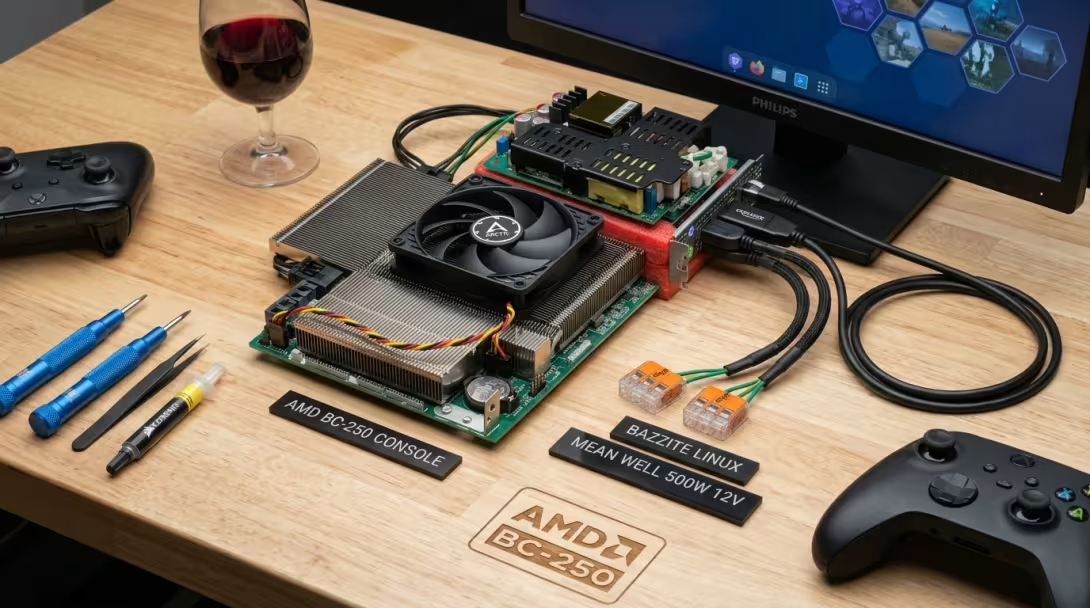
🎮 Living Room Console: Assembling, Booting, and Tuning the AMD BC-250 Under Bazzite Linux
1. From Blueprint to Reality
In Part 1: Repurposing PlayStation 5 Silicon, we explored the raw silicon architecture of the ASRock AMD BC-250—a monolithic 7nm die packing 8 Zen 2 cores, up to 40 RDNA 2 Compute Units, and 16GB of high-speed unified GDDR6 memory originally destined for the PlayStation 5. In Part 2: Project Blueprint & Sourcing, we drafted our bill of materials, designed an open-frame 12V power supply harness, and planned an air-cooled living room Steam Machine.
Now, theory gives way to hands-on hardware hacking.
The parcels have arrived, the soldering iron is hot, and the BC-250 is fully assembled, running, and delivering frames from the TV bench. Here is the complete build log covering wiring the custom power harness, thermal preparation, first boot quirks, Bazzite Linux deployment, and setting up the emulation powerhouse.
+-------------------------------------------------------------------------+
|                    THE COMPLETED BC-250 RIG AT A GLANCE                 |
|                                                                         |
|  * Silicon:      AMD BC-250 APU (Oberon / Cyan Skillfish, 4C/8T Zen 2)  |
|  * Graphics:     RDNA 2 APU (4.0 GB VRAM Carveout + 11.4 GB System RAM) |
|  * Power:        Mean Well LOP-500-12 (500W 12V Single Rail)            |
|  * Thermals:     Arctic PWM Cooling + Corsair XTM50 & Arctic TP-3       |
|  * Storage:      Samsung 2TB M.2 NVMe PCIe SSD                          |
|  * OS:           Bazzite 44 (Kinoite / Linux 7.2.7-ogc gaming kernel)   |
|  * Interface:    Steam Gaming Mode UI + EmuDeck / EmulationStation-DE   |
+-------------------------------------------------------------------------+
2. Power Harness Fabrication: 12V Single-Rail Precision
Because the BC-250 is an industrial mining board, it completely lacks standard 24-pin ATX or 8-pin EPS desktop headers. It feeds exclusively on raw 12V DC power across PCIe power terminals.
flowchart TD
    AC["AC Mains 220V"] --> JST["JST VH3.96 Connector"]
    JST --> PSU["Mean Well LOP-500-12
(500W 12V DC Output)"]

    PSU -->|"+12V DC"| WAGO_POS["WAGO 221-415 (+12V Distribution)"]
    PSU -->|"GND"| WAGO_GND["WAGO 221-415 (GND Distribution)"]

    WAGO_POS --> PCIe["8-pin PCIe Connector to Motherboard"]
    WAGO_GND --> PCIe

    %% Styling
    style AC fill:#f4f4f4,stroke:#666,stroke-width:1px
    style PSU fill:#e1f5fe,stroke:#0288d1,stroke-width:1.5px
    style WAGO_POS fill:#ffebee,stroke:#d32f2f,stroke-width:1px
    style WAGO_GND fill:#eceff1,stroke:#455a64,stroke-width:1px
    style PCIe fill:#e8f5e9,stroke:#388e3c,stroke-width:1.5px
The Wiring Build Steps:
1. AC Mains Input: Terminated the 220V mains cable using the 3-pin JST VH3.96 (3.96mm pitch) female housing, locking phase, neutral, and earth into the high-voltage input header of the Mean Well LOP-500-12. 2. DC Distribution via WAGO 221: The 12V outputs from the Mean Well PSU were bridged into compact WAGO 221-415 5-conductor lever connectors—one block handling positive +12V DC lines, and the other consolidating grounds. 3. PCIe Power Extension Cable: The 18 AWG deleyCON PCIe 6+2 pin cable leads were cleanly stripped, inserted into the WAGO distribution blocks, and firmly seated into the BC-250's power input header.3. Thermal Preparation: Quiet Air Cooling over Complex Liquid Loops
Initial community builds often reach for 240mm or 360mm AIO liquid coolers, but that introduces custom CNC retention brackets, pump whine, and potential leak hazards inside a living room console. An optimized air-cooling setup proves far simpler and remarkably quiet:
1. Corsair XTM50 Thermal Paste: The factory industrial thermal compound was dried up and poorly spread. The APU die was stripped with 99.9% isopropyl alcohol and treated with fresh Corsair XTM50 high-performance thermal paste.
2. VRM & VRAM Thermal Pads: Arctic TP-3 thermal pads were applied across the MOSFETs, inductors, and rear GDDR6 memory packages to soak up transient heat into the heatsink assembly.
3. Arctic PWM PST Cooling: An Arctic PWM PST fan was mounted directly over the main aluminum fin stack above the APU die, utilizing Arctic's integrated PST daisy-chain header to seamlessly support additional VRM and chassis airflow.
4. Single-Header Automation: Connected directly into the BC-250's single motherboard 4-pin PWM header, the system dynamically regulates fan speeds based on silicon temperature—running near-silent at idle and holding stable temperatures around 62–68°C under full synthetic gaming load.
4. First Boot & Display Quirks: Solving the Phantom DisplayPort
First Boot & Bazzite Installation
First boot and operating system deployment proceeded smoothly with a straightforward setup workflow:- BIOS Boot Override: Flashed Bazzite (Kinoite edition) onto a USB thumbdrive. Pressing the
Deletekey during POST brings up the BC-250 BIOS settings, allowing a direct boot override to the installer media. - Network Requirement During Installation: While the installer booted locally from USB, Bazzite's immutable
rpm-ostreeimage deployment required an active network connection to verify and pull deployment commits. Connecting a wired Ethernet cable allowed the installer to pass this step and finalize without issue.
card1-DP-1: status=connected, enabled=enabled (2560x1440 @ 144Hz)
card1-DP-2: status=disconnected, enabled=disabled
Why Does Linux Detect Two DisplayPorts When There Is Only One?
The monolithic Oberon APU silicon integrates multiple Display Core Next (DCN) display PHYs capable of multi-monitor output. However, because ASRock manufactured this board specifically for crypto mining racks where external displays are rarely needed, only a single physical DisplayPort 1.4 socket was soldered onto the I/O bracket.The second display lane (card1-DP-2) exists purely in the APU's VBIOS table as unpopulated traces on the PCB. The native Linux amdgpu driver dutifully exposes both display controllers, but only card1-DP-1 carries the physical link.
Pairing DP-1 with an active DisplayPort 1.4 to HDMI 2.1 adapter (such as the Delock 63938) allows the rig to output clean 4K 60Hz/120Hz HDR directly to modern QD-OLED and 4K TVs.
5. Software Stack: Deploying Bazzite Linux
To turn this hardware into a true appliance-like console, Bazzite 44 (Kinoite edition) was installed onto the 2TB NVMe SSD.
+--------------------------------------------------------------------------+
|                     SYSTEM TOPOLOGY & SPECS VERIFIED                     |
+--------------------------------------------------------------------------+
| Kernel:       Linux 7.2.7-ogc1.1.fc44.x86_64                             |
| CPU:          AMD BC-250 (4 Cores / 8 Threads @ 3.20 GHz)                |
| Memory Pool:  16 GB Unified GDDR6 SDRAM                                  |
|   - VRAM:     4.00 GB Dedicated Carveout (amdgpu DRM)                    |
|   - Host RAM: 11.40 GB Usable Userspace RAM + 5.7 GB zram swap           |
| GPU Driver:   Native upstream amdgpu + Mesa RADV (Vulkan 1.4)            |
| Storage:      2 TB NVMe SSD (btrfs root + deduplicated subvolumes)       |
+--------------------------------------------------------------------------+
+----------------------------------------------------------------------------------+
| DETAILED GRAPHICS DRIVER INFORMATION |
+----------------------------------------------------------------------------------+
| Kernel Driver: amdgpu |
| Hardware Device: AMD Cyan Skillfish / BC-250 (01:00.0, gfx1013, 1002:13fe) |
| Kernel DRM: DRM 3.64 (Kernel: 7.2.7-ogc1.1.fc44.x86_64) |
| Userspace Mesa: radeonsi (Mesa 26.2.2, ACO compiler) |
| OpenGL Profile: OpenGL 4.6 (Core Profile) / ES 3.2 |
+----------------------------------------------------------------------------------+Dialling in the Memory Balance: 4GB VRAM Sweet Spot
Because the 16GB of GDDR6 is unified, the BIOS VRAM allocation policy is critical:- The 12GB Pitfall: Assigning a massive 12GB static VRAM slice in firmware starves the operating system, leaving less than 4GB for the Linux kernel, Proton runtimes, and background processes—triggering immediate Out-Of-Memory (OOM) killer terminations.
- The 4GB Sweet Spot: Allocating 4.00 GB for dedicated VRAM leaves a spacious 11.40 GiB for system userspace, backed by 5.7 GiB of zram and a 16 GB NVMe swapfile. Because all 16GB is unified GDDR6, any game or emulator demanding more graphics memory seamlessly spills into system memory via
amdgpu's Graphics Translation Table (GTT) with zero bus bandwidth penalty.
🚀 Bazzite Portal: The Console Onboarding Experience
One of the standout advantages of using Bazzite over a standard DIY Arch or Fedora install is the Bazzite Portal utility. Rather than requiring endless terminal commands to configure system services, Bazzite launches with a polished post-install wizard: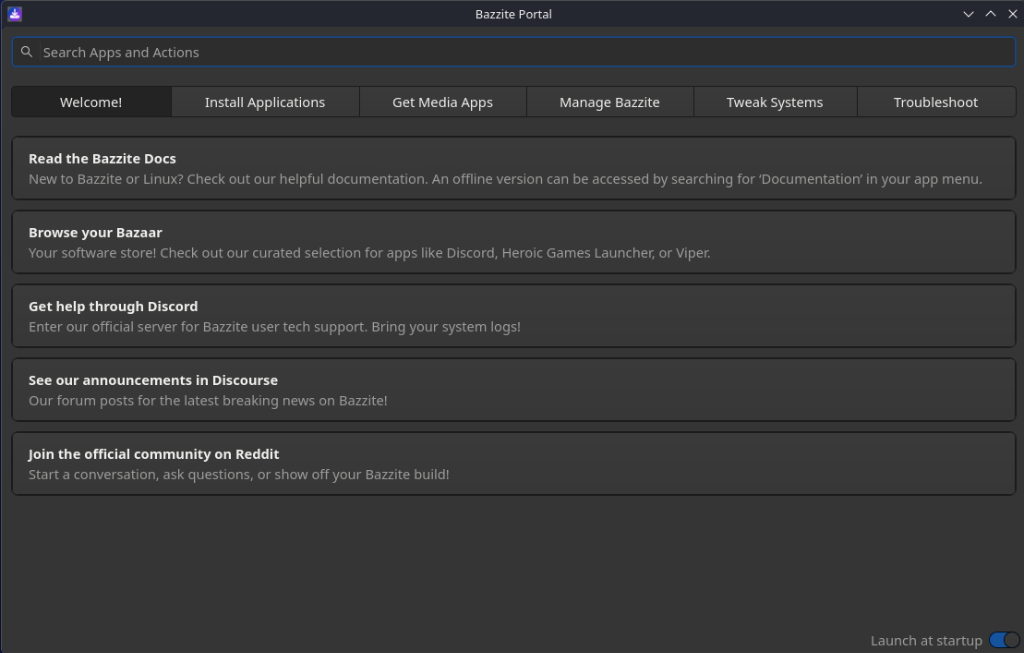
The Bazzite Portal welcome interface, providing direct shortcuts to documentation, community support, and the curated Bazaar software store.
Beyond guiding initial software installation, the Tweak Systems tab provides immediate toggle control over essential console behaviors:
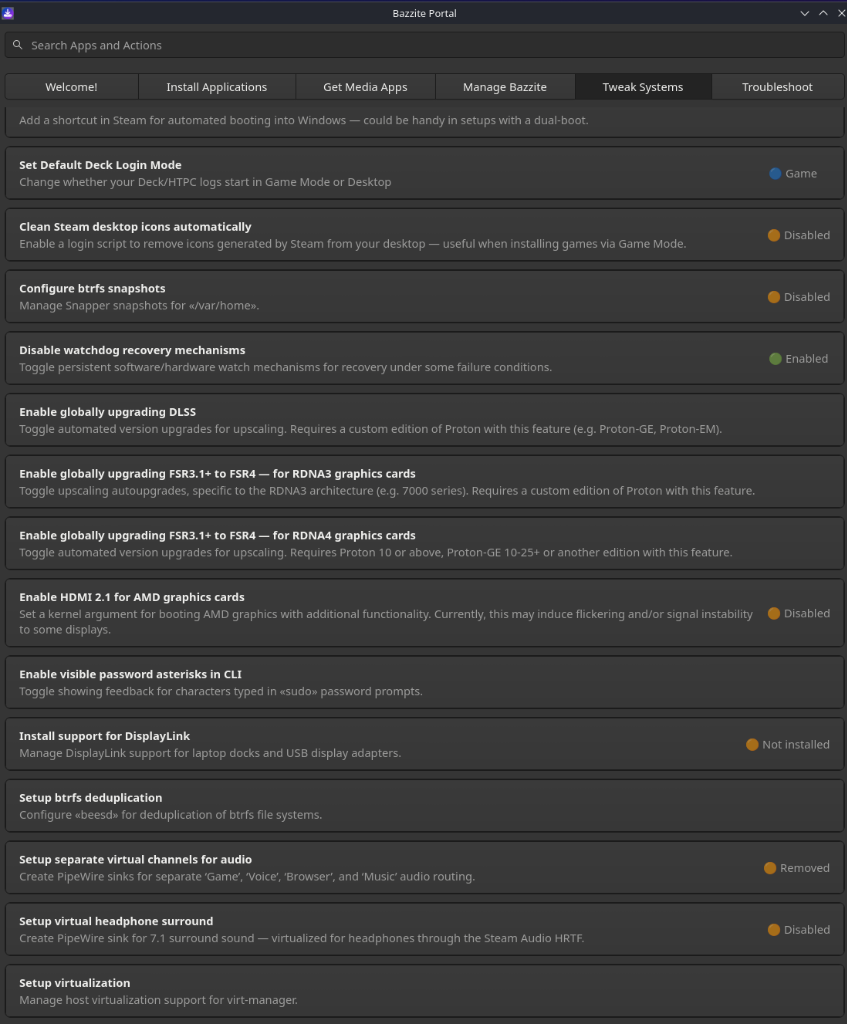
Bazzite Portal System Tweaks: Setting default Deck Game Mode login, managing Snapper btrfs snapshots, and configuring PipeWire virtual audio sinks.
Key conveniences dialed in directly through the Portal:
- Set Default Deck Login Mode: One-click toggling between Game Mode (direct boot into Steam's 10-foot couch interface) and Desktop Mode.
- Btrfs Snapshots (Snapper): Instantly creates atomic system rollback points before applying experimental kernel patches or custom GPU profiles.
- Btrfs Deduplication (
beesd): Seamless background block-level deduplication to squeeze every gigabyte out of the 2TB NVMe drive across duplicate ROM sets and Proton prefixes. - Virtual Audio Routing: Effortlessly configures PipeWire sinks for clean channel isolation between game audio, background music, and Discord.
6. Living Room Emulation Setup: EmuDeck & Controller Pairing
With the base OS configured to boot straight into Steam Gaming Mode, setting up retro gaming becomes a streamlined, couch-friendly process.
Controller Button Layouts & Navigation
When navigating between Steam Gaming Mode, retro emulators, and standalone PC titles, controller button schemes require attention. While Steam Input can remap virtually any gamepad, mismatched button legends can cause confusion when retro emulators expect specific physical ABXY locations:For reference, the primary controller face-button standards:
       NINTENDO SWITCH                    MICROSOFT XBOX               SONY PLAYSTATION
 ┌─────────────────────┐    ┌──────────────────────────┐    ┌──────────────────────────┐
 │                     │    │                          │    │                          │
 │         ╭───╮       │    │          ╭───╮           │    │          ╭───╮           │
 │         │ X │       │    │          │ Y │ (Yellow)  │    │          │ △ │ (Cyan)   │
 │         ╰───╯       │    │          ╰───╯           │    │          ╰───╯           │
 │                     │    │                          │    │                          │
 │ ╭───╮         ╭───╮ │    │   ╭───╮          ╭───╮   │    │   ╭───╮          ╭───╮   │
 │ │ Y │         │ A │ │    │   │ X │          │ B │   │    │   │ □ │          │ ○ │   │
 │ ╰───╯         ╰───╯ │    │   ╰───╯          ╰───╯   │    │   ╰───╯          ╰───╯   │
 │                     │    │  (Blue)          (Red)   │    │  (Pink)          (Red)   │
 │         ╭───╮       │    │          ╭───╮           │    │          ╭───╮           │
 │         │ B │       │    │          │ A │ (Green)   │    │          │ ✕ │ (Blue)    │
 │         ╰───╯       │    │          ╰───╯           │    │          ╰───╯           │
 │                     │    │                          │    │                          │
 └─────────────────────┘    └──────────────────────────┘    └──────────────────────────┘
The BC-250 build defaults to the Nintendo button layout, matching familiarity with retro handhelds and console emulation.
8BitDo Ultimate Wireless (2.4 GHz)
- Plug-and-Play Simplicity: Connecting the 2.4 GHz USB adapter to the hub provides instant, low-latency wireless input without Bluetooth pairing rituals.
- Dual Controller Setup: Starting with two 8BitDo wireless controllers (including the Ultimate with charging dock) covers couch co-op out of the box, with full headroom to expand to a 4-player party setup.
Arcade Stick Integration (Planned)
- Adding a dedicated arcade fight stick is on the roadmap for fighting games and classic shmups, expanding on our earlier arcade controller field guide.
PlayStation 5 DualSense Support (Bluetooth)
Under Bazzite, Sony's officialhid-playstation kernel module is baked directly into the system, enabling native DualSense support via an external Bluetooth 5.3 dongle:
- Zero manual driver compilation required.
- Native touchpad cursor control in desktop mode.
- Full motion gyroscope aiming in supported emulators.
- Bluetooth auto-reconnect when waking the controller from the couch.
The Emulation Tier Performance
Deploying EmuDeck configures standalone emulators and integrates titles cleanly into EmulationStation-DE:| Console Generation | Target Emulator | Resolution / Scaling | Observed Performance |
|---|---|---|---|
| 8-bit / 16-bit / PS1 / N64 | RetroArch (Beetle, Mupen64) | 4K Native + CRT-Royale Shaders | Locked 60 FPS (Flawless) |
| PlayStation 2 | PCSX2 (Vulkan backend) | 3x Native (1080p) / 4x (1440p) | Locked 60 FPS (Gran Turismo 4, God of War II) |
| Nintendo GameCube / Wii | Dolphin (Vulkan backend) | 3x–4x Internal Resolution | Locked 60 FPS (F-Zero GX, Metroid Prime) |
| PlayStation 3 | RPCS3 (Vulkan + LLVM Recompiler) | 720p Native / 1080p Scaled | 30–60 FPS (Demon's Souls, Persona 5) |
| Nintendo Switch | Eden (Vulkan) | 1080p Docked | 60 FPS (Mario Kart 8 Deluxe, Super Mario Odyssey) |
7. Conclusions: An Unbeatable E-Waste Console
Rescuing the AMD BC-250 from the crypto mining scrapheap and transforming it into an ultra-quiet, 8-thread living room emulation rig has been one of the most rewarding hardware projects yet.
For a fraction of the cost of a commercial console or a dedicated living room mini PC (which easily push €800–€1,000+), we now have an open, repairable, x86-compatible machine powered by genuine PlayStation 5 silicon—running upstream Linux, modern Vulkan drivers, and thousands of retro classics from the comfort of the sofa.
Stay tuned for further updates on 3D printed enclosure files, custom fan shroud designs, and extended power-tuning benchmarks.