Escaping the 1984 Canvas: Scott Jenson on Why Linux Must Reinvent Desktop UX
Original Source & Credits
- Channel: The KDE Org
- Video Title: Scott Jenson: Are we really going to use the same Desktop UX forever?
- Publication Date: September 19, 2026
- Watch on YouTube: https://www.youtube.com/watch?v=V7AfAcQwLW0
What peaked my interest?
- Since I really love the UX way of working and I also see the added value of it, this talk caught my eye. Actually I'd already seen the previous iteration of this talk, a couple of years ago.
- The current iteration was at Akademy 2026 a yearly KDE developer conference and Scott - after setting the context - showed some nice practical prototypes to the audience. Some very nice ideas in there on improving our desktop User Experience. Would be so cool to see some of these features in our desktop of the future.
TL;DR
- The 20-Year Interface Freeze: The desktop interface has barely evolved since the late 1990s. Commercial giants like Apple and Microsoft are paralyzed by legacy backwards-compatibility, trillion-dollar moats, and risk aversion.
- The Curse of Direct Manipulation: Direct manipulation is fast and tactile, but entirely stateless. Close a window or overwrite your clipboard, and your task context evaporates.
- The "Missing Middle" of Desktop AI: Instead of intrusive screen-scraping bots (like Windows Recall) or superficial chatbot sidebars, desktop intelligence belongs in working memory—grounded directly in local filesystems and private, ethical Small Language Models (SLMs).
- The Three-Pillar Working Memory Blueprint: Jenson proposes rebuilding desktop environments around Spatial Memory (ultrawide central focus and peripheral stashes), Associative Memory (document-bound scrapbooks), and Episodic Memory (privacy-preserving attention telemetry).
- Open Source Leadership: Linux and KDE are the only ecosystems free enough to experiment in the open, turning Wayland and modern graphics pipelines into a living lab for computing's next 20 years.
The Great Interface Stagnation
Between 1984 and 1995, personal computing witnessed a frantic Cambrian explosion. Xerox PARC concepts crystallized into the original Macintosh, multi-tasking window managers matured, and Windows 95 established the taskbar and desktop conventions that billions of people still recognize today.
And then, personal computing hit a wall.
For the past twenty years, the core interaction model of desktop computing has remained frozen in place. We still double-click nested folders, hunt for minimized windows across a flat 2D plane, paste from a single-item volatile clipboard, and juggle dozens of disconnected application silos.
In a standout keynote presented to the KDE community, veteran human interface designer Scott Jenson—whose career spans foundational UX work at Apple (including the classic Mac Finder), Symbian, and Google—laid bare the uncomfortable reality: commercial tech giants are no longer innovating on desktop interaction. If computing is to break out of its 2D windowing prison, the open source community must step up and lead.
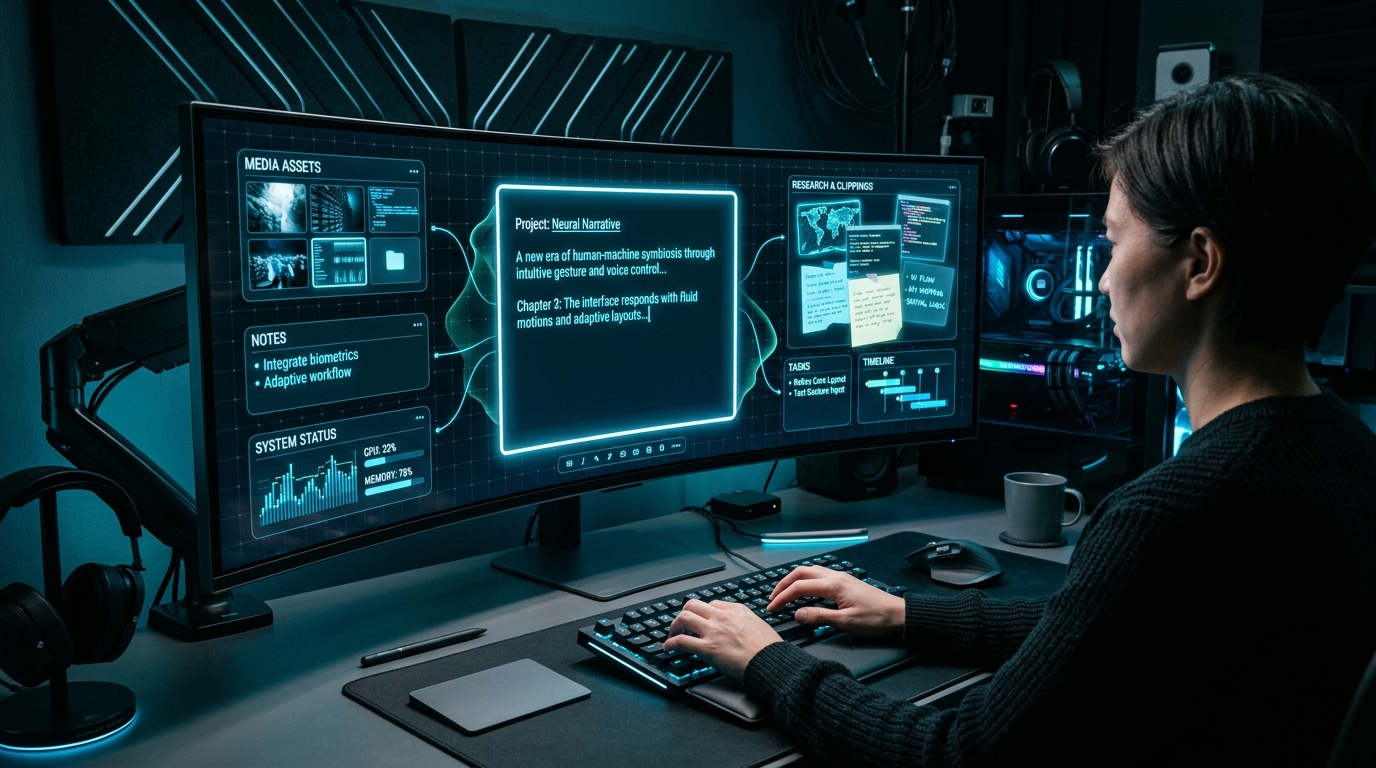
Image: AI-impression — A conceptual vision of spatial desktop interaction designed around focused task canvases and peripheral contextual drawers.
The Drafting Trap: When Big Tech Stops Moving
For decades, open-source desktop environments such as KDE and GNOME adopted a pragmatic, highly effective strategy: drafting behind Apple and Microsoft.
Let Cupertino and Redmond spend hundreds of millions of dollars on UX research, usability labs, and commercial risk. Let them make the embarrassing missteps—like Microsoft's Clippy or Apple's butterfly keyboard—while Linux environments selectively adopt the patterns that actually survive contact with reality.
The problem, Jenson notes, is that the leaders have stopped moving:
1. Apple Tried to Kill the Mac: In 2017, Apple was convinced the iPad was the future of computing (punctuated by their famous "What's a computer?" campaign). They stripped ports from MacBook Pros, ignored the Mac Pro for years, and let macOS languish. While pro user backlash forced a hardware renaissance with Apple Silicon, macOS software features today are predominantly focused on ecosystem lock-in—tying Macs ever closer to the iPhone—rather than evolving the desktop paradigm.
2. Microsoft Paralyzed by Legacy and Monetization: Microsoft remains encumbered by backwards compatibility across hundreds of millions of corporate machines. When they do attempt radical shifts, they often alienate users: the jarring touch-first catastrophe of Windows 8, aggressive telemetry and OneDrive upsells, and the recent architectural disaster of Windows Recall.
3. Drafting Behind a Stationary Truck: If proprietary vendors have ceased exploring human-computer interaction, Linux distros can no longer wait for external guidance. "You cannot patch and bug-fix your way into the future," Jenson emphasized. "We have to start taking leadership ourselves."
Dismantling the Three Anti-Innovation Myths
Whenever someone suggests that the desktop needs a structural overhaul, they are invariably met with three entrenched counterarguments. Jenson systematically takes them apart:
1. "Mobile Won. The Desktop is Dead."
Mobile unquestionably won consumer entertainment, casual gaming, social media feeds, and portable photography. But mobile never won deep productivity.No software engineer writes complex backend systems on an iPhone. No architect drafts blueprints on an iPad without a keyboard and mouse. Desktops have quietly remained computing superpowers: large physical displays, spatial persistence, millimeter-precise pointing devices, ergonomic keyboards, and high information density. Mobile's "one app at a time" sandbox is a productivity bottleneck; users routinely start research on a phone only to sit down at a desktop to actually get work done.
2. "The Desktop is a Settled Standard."
Standards feel eternal until they are made obsolete by better tools. CD-ROMs, BlackBerry physical thumb-boards, and 4:3 CRT monitors were once undisputed industry standards. Just because 2D overlapping windows have lasted 40 years does not mean they represent the mathematical pinnacle of interface design.3. "Don't Touch My Setup."
Power users who have spent years tweaking tiling window managers, keyboard shortcuts, and dotfiles understandably resist arbitrary changes. But genuine innovation does not mean breaking existing workflows or imposing top-down mandates. It means developing optional, parallel prototypes that users can adopt when they clearly prove superior.Understanding the Real Layers of UX
A recurring theme in Jenson's critique is how the software industry has degraded the discipline of design.
True human interface design operates across four distinct structural tiers:"I hate the term 'UI/UX' with the heat of a thousand suns," Jenson remarked. "It is the stupidest term that has ever been invented... UX is composed of twelve different disciplines, and now it has been reduced to just two words that people think mean 'pixels'."
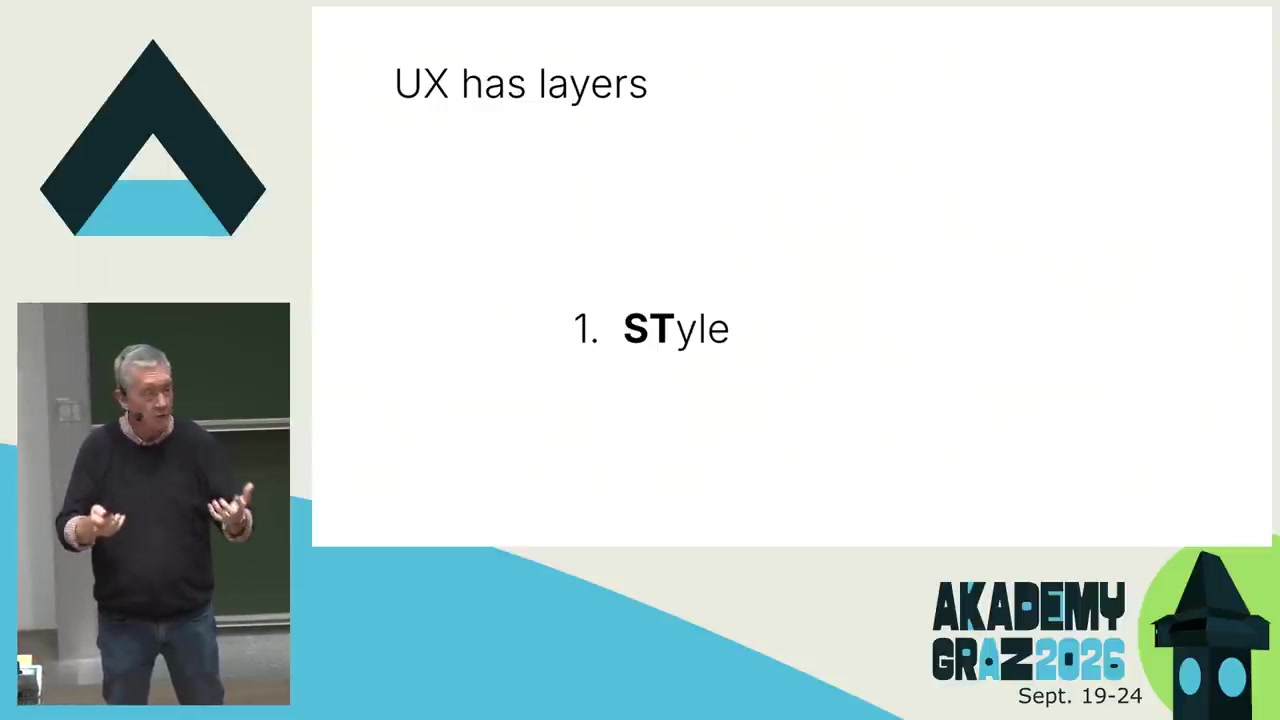
Scott Jenson presenting the four foundational layers of user experience at KDE Akademy 2026 (Watch at 14:18 in talk). (Image: Slide capture from conference stream).
1. Style: The surface layer—iconography, colors, white space, and visual polish.
2. Structure: Navigation patterns, error recovery, application flow, and information hierarchy.
3. Strategy: Understanding who the user is, defining clear objectives, and crucially, helping teams say no to non-essential complexity.
4. "Stuff" (The Substrate & Historical Cruft): The architectural baggage and technological assumptions inherited from decades past that we blindly accept without question.
The 1984 Canvas in a 4K World
As a quintessential example of historical cruft, consider window management. The original 1984 Macintosh display measured a tiny 512 × 342 pixels—smaller than a single thumbnail icon on a modern retina display.In 1984, overlapping windows were an ingenious geometric trick to fit multiple documents onto a screen smaller than an iPad Mini. Today, users connect dual 4K panels or 49-inch curved ultrawides, yet operating systems still treat screen real estate like a jumbled stack of 342-pixel index cards. Window managers force users to become manual janitors—constantly moving, resizing, and minimizing windows just to maintain focus.
The AI Desktop: Finding "The Missing Middle"
How does artificial intelligence intersect with desktop operating systems? Jenson observes that modern tech companies are attacking the problem from both extremes while completely missing the high-leverage sweet spot.
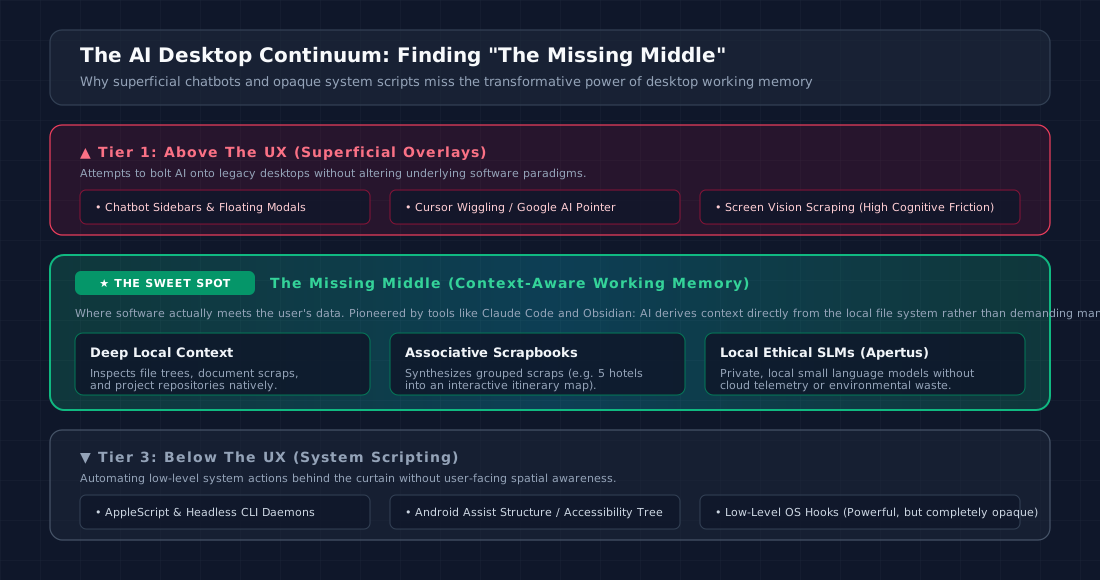
Architectural comparison of superficial desktop AI approaches versus the context-grounded Missing Middle.
- Above the UX (Superficial Overlays): Chatbot sidebars, floating widgets, and gimmicks like Google's AI pointer or screen-scraping vision models. These systems treat the desktop as an opaque visual surface, creating severe cognitive friction and user distraction.
- Below the UX (Headless Automation): Low-level system scripting (AppleScript, accessibility trees, background daemons). While technically capable, these mechanisms operate behind the curtain, offering zero spatial or conceptual visibility to the user.
- The Missing Middle (Context-Aware Working Memory): The true breakthrough occurred when developer-facing tools like Claude Code and knowledge environments like Obsidian began pointing models directly at the local filesystem. By grounding intelligence in the actual files, notes, and directories of the user, the model gains rich situational awareness without requiring repetitive prompting.
Furthermore, Jenson advocates strongly for ethically trained Small Language Models (SLMs) running entirely on local silicon. Projects like the Swiss government's Apertus demonstrate that compact, open, transparently trained models can provide outstanding contextual summarization and extraction on local machines—completely bypassing cloud privacy liabilities and massive environmental compute footprints.
The Blueprint: A Three-Pillar Working Memory Desktop
The fatal flaw of modern desktop computing is what Jenson terms the curse of direct manipulation: it is fast, tactile, and direct, but completely stateless. If you copy three items consecutively, the first two are obliterated. If you spend three hours researching a topic across 40 browser tabs and close your laptop, reconstructing that mental model tomorrow morning is an exercise in frustration.
To solve this, Jenson outlines a comprehensive Working Memory Architecture built upon three interrelated psychological foundations:
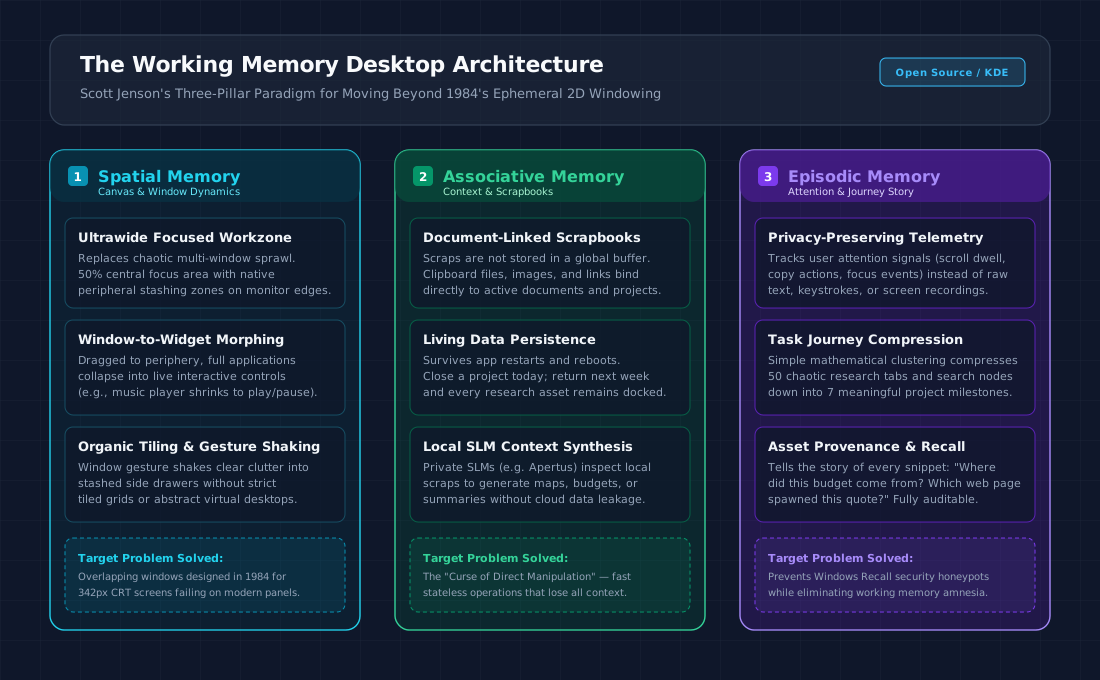
The three architectural pillars of Scott Jenson's proposed next-generation desktop paradigm.
Pillar 1: Spatial Memory (The Ultrawide Workzone)
Rather than designing for cramped 13-inch laptop displays, what happens if we design unapologetically for massive, ultrawide workspaces?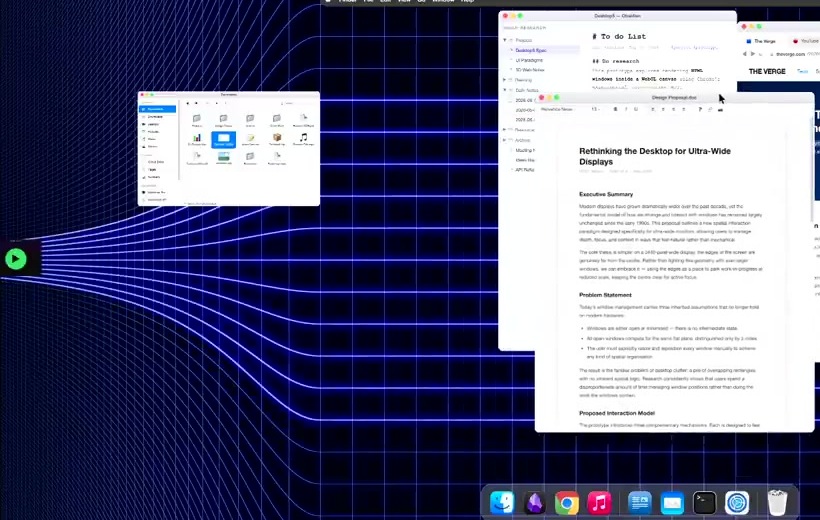
Live prototype demonstration: As an active application window is dragged to the peripheral workspace, it seamlessly collapses into an interactive compact widget (Watch at 32:00 in talk). (Image: Slide capture from conference stream).
- Central Focus vs. Peripheral Stash: Jenson's prototype establishes an active 50% central focus area directly in front of the user, flanked by peripheral margin zones.
- Window-to-Widget Morphing: When a peripheral utility (like a music player, reference document, or chat window) is pushed to the screen edges, it does not minimize to a hidden dock. Instead, borrowing responsive design principles from the web, it morphs into a live, interactive widget (e.g., shrinking a full music app into a sleek play/pause control).
- Organic Shaking & Decluttering: Rather than relying on rigid tiling grids or complex virtual desktop matrices that most consumers ignore, a simple natural window gesture sweeps transient clutter into organized edge drawers.
Pillar 2: Associative Memory (Document-Centric Scrapbooks)
Every knowledge worker knows the pain of collecting fragments—images, PDF quotes, spreadsheet excerpts, URLs—while drafting a document. Today, those pieces are scattered across download folders, browser histories, and text scratchpads.
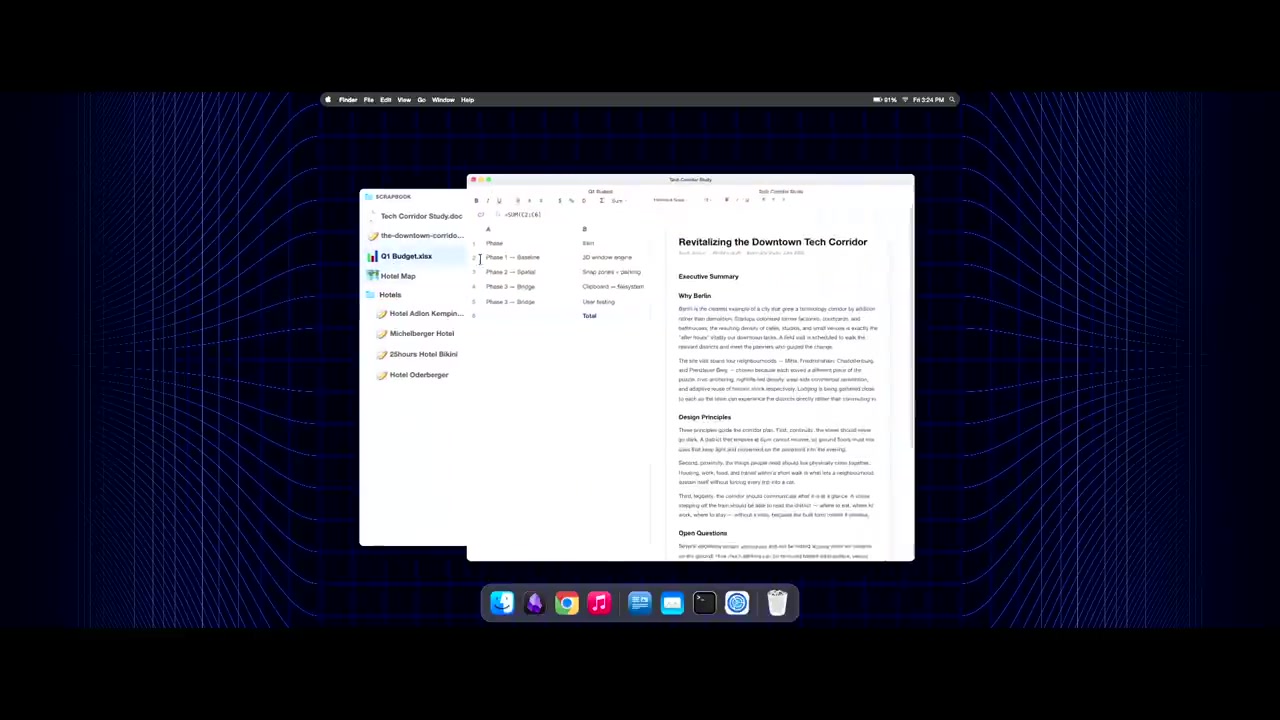
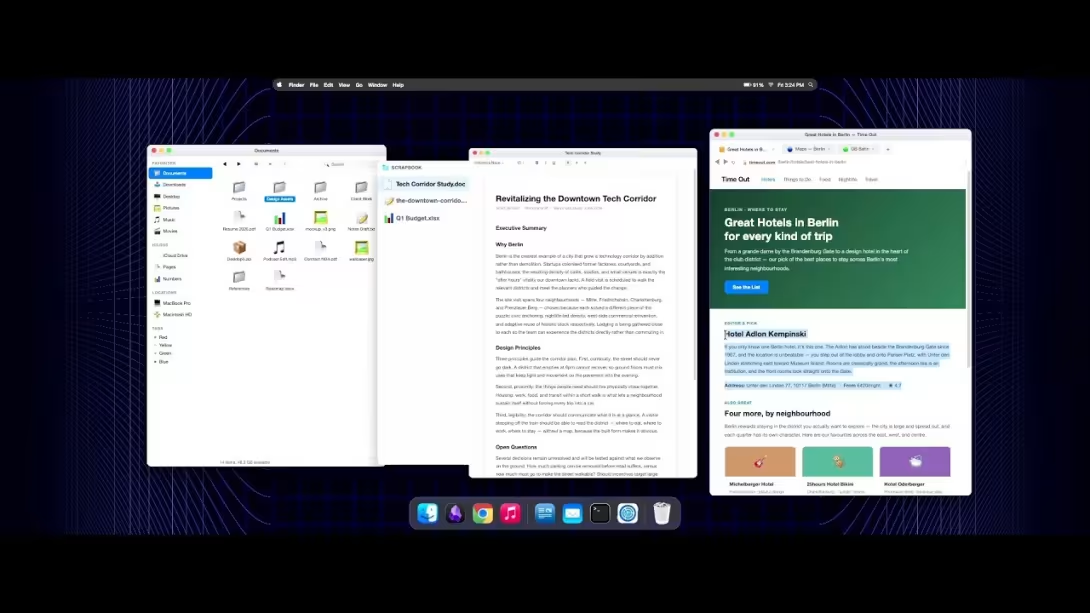
Live prototype demonstration: A dedicated Scrapbook drawer attached directly to the active document window, holding persistent cross-app references, web links, and spreadsheets (Watch at 33:50 in talk). (Image: Slide capture from conference stream).
- Project-Linked Scrapbooks: Jenson demonstrated a working prototype where clipboards are no longer global volatile caches, but dedicated scrapbook drawers attached to specific documents.
- Cross-Application Drag-and-Drop: Users can drag arbitrary text selections, web elements, or image files directly into the document's scrapbook. The scraps persist across days, reboots, and application launches.
- Local Contextual Synthesis: With research materials anchored directly to the document, local SLMs can perform targeted tasks on demand—such as taking five hotel URLs gathered in the scrapbook and instantly rendering a comparison table or geographical map directly into the drafting canvas.
Pillar 3: Episodic Memory (Privacy-Preserving Attention Telemetry)
The controversy surrounding Microsoft Recall proved that taking unencrypted, full-resolution screen recordings every few seconds creates a catastrophic security honeypot that users rightly reject. Yet the underlying need—remembering what you were doing and where that data came from—remains critical.
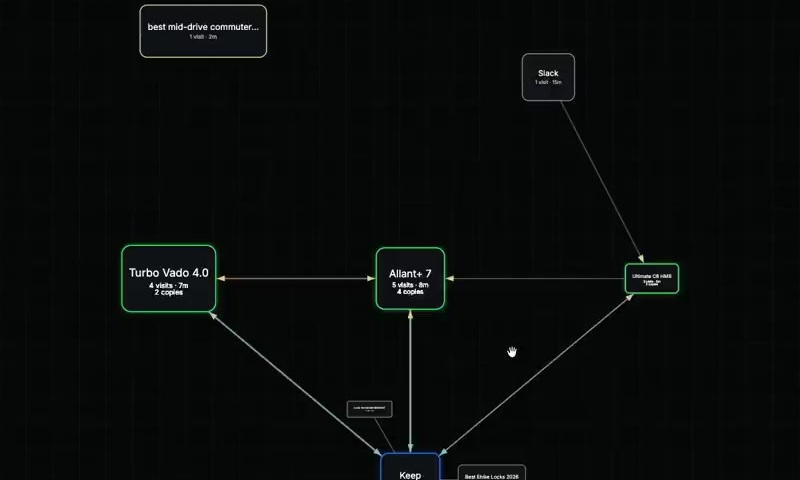
Episodic memory prototype: Attention signals (dwell time, scrolling, copy triggers) compress 50 chaotic browsing nodes into 7 meaningful research milestones (Watch at 35:15 in talk). (Image: Slide capture from conference stream).
- Attention Signals Instead of Screen Scraping: Rather than recording text, passwords, or bitmap pixels, Jenson's prototype captures lightweight, non-invasive attention metrics: How long did you dwell on a page? Did you scroll through the whole document? Did you trigger a copy event?
- Graph Compression (50 Nodes to 7): Using simple mathematical clustering rather than heavy neural networks, a session of 50 sprawling browser tabs and searches is compressed into a clean, human-readable timeline of 7 key project milestones.
- Living Provenance: When reviewing a project weeks later, the system can answer crucial context questions: Where did this paragraph originate? Which source document generated this budgetary table?
Why Open Source Must Seize the Initiative
The software industry is at an inflection point. Commercial operating systems have settled into conservative rent-seeking, prioritizing advertising placements, ecosystem lock-in, and cloud upsells over foundational interface ergonomics.
The open-source community—specifically ecosystems like KDE Plasma running atop modern Wayland compositors—holds unique structural advantages:
- Architectural Flexibility: Wayland protocols and modular compositors (such as KWin) provide all the technical plumbing necessary to implement window morphing, custom spatial layouts, and cross-application scrapboards today.
- Freedom from Quarterly Earnings: Open source developers are not beholden to corporate growth targets, allowing teams to explore bold, unconventional interaction models that commercial product managers would immediately veto.
- The Ink & Switch Prototype Model: Jenson cited the research methodology of lab Ink & Switch: assemble small, focused cross-disciplinary teams, build working prototypes rapidly, evaluate their tangible ergonomics in the real world, and open-source the results.
Scott Jenson’s keynote is more than a retrospective on design missteps; it is a direct call to arms for hackers, designers, and system architects. The fundamental metaphors of desktop computing do not have to remain frozen in 1984. The tools to build computing's next chapter are already in our hands—we just have to be willing to break out of our windows.