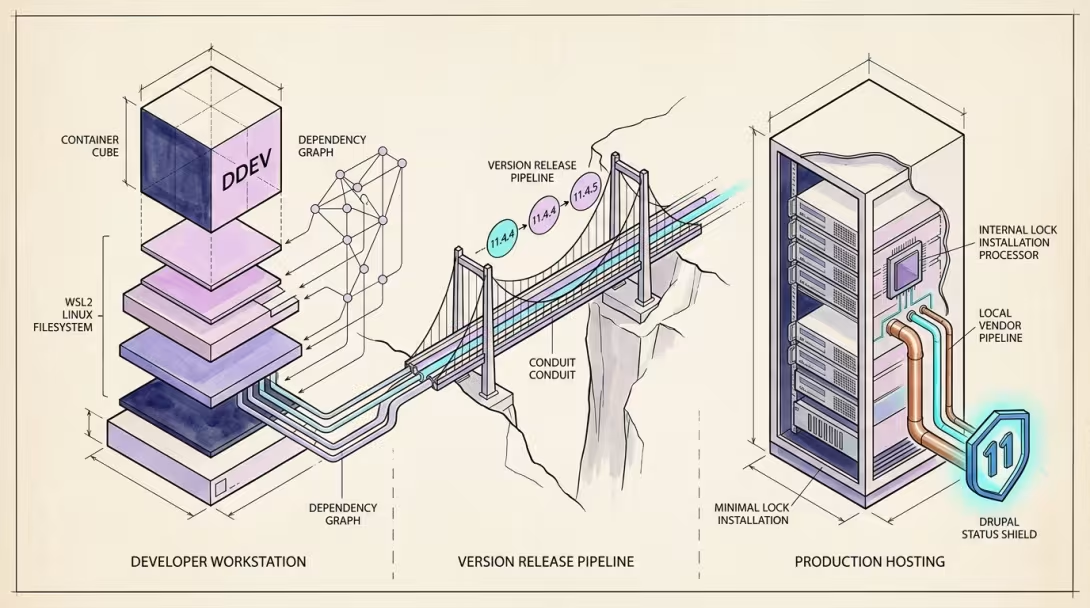
Upgrading Drupal 11 Core Across DDEV, WSL2, and Shared Hosting
A field guide for upgrading minor and patch releases of Drupal 11 core across local DDEV containers in WSL2 and deploying to production shared hosting environments.
Key Principles & Operational Takeaways
1. Native WSL2 Filesystem Boundary: Execute Composer and Drush commands inside the native Linux filesystem (~/drupal), not across Windows host mounts (/mnt/c/...). Cross-OS mounts degrade I/O and break DDEV compose resolution (.ddev-docker-compose-full.yaml).
2. Synchronized Core Upgrades: Always upgrade core packages together using ddev composer update "drupal/core-*" --with-all-dependencies. This keeps drupal/core-recommended, drupal/core-composer-scaffold, and drupal/core-project-message pinned to identical upstream releases.
3. Targeted Upstream Tracking: On new feature branches, establish remote tracking on the first push via git push -u origin feature/upgrade-drupal-11-4-5.
4. Explicit PHP CLI Runtime on Shared Hosts: Shared hosting platforms (such as STRATO) often default the global php CLI alias to older PHP runtimes. Explicitly prefix CLI tasks with the correct binary: php8.4 ./vendor/bin/drush updatedb -y.
5. Twig Cache Lock Eviction: Shared storage clusters frequently lock active Twig bytecode caches. Purge sites/default/files/php/twig/* before invoking cache rebuilds.
Environment Architecture
Drupal 11 maintenance flows through two distinct environments with differing filesystem and process isolation constraints:
flowchart TD
    classDef localDev fill:#E9D5FF,stroke:#9333EA,stroke-width:2px,color:#1E293B;
    classDef remoteHost fill:#BAE6FD,stroke:#0284C7,stroke-width:2px,color:#1E293B;

    subgraph LocalDev ["Local Machine (Windows + WSL2)"]
        A["Native Linux Filesystem (~/drupal)"]:::localDev -->|DDEV Container| B["Local Web and DB Containers"]:::localDev
        C["Host Mount (/mnt/c/...)"]:::localDev -.->|Slow Cross-OS 9P Mount| A
    end

    subgraph GitWorkflow ["Source Control"]
        A -->|git commit and push| D["GitHub Repository (main)"]:::remoteHost
    end

    subgraph ProductionEnv ["Shared Production Hosting (STRATO)"]
        D -->|git pull or deploy runner| E["Production Webroot (/var/www/drupal_01)"]:::remoteHost
        E -->|php8.4 composer.phar install| F["Updated Vendor Assets"]:::remoteHost
        F -->|php8.4 ./vendor/bin/drush updatedb| G["Production Drupal 11.4.5"]:::remoteHost
    end
Step 1: Pre-Upgrade Branching & Database Baseline
Create a rollback baseline before modifying dependencies.
1. Create an Isolated Working Branch
cd ~/drupal
git checkout -b feature/upgrade-drupal-11-4-5
2. Export Database Dump
ddev drush sql-dump --result-file=../backup-pre-update.sqlStep 2: Upgrading Drupal Core in DDEV (WSL2)
1. Update Core Dependencies with Composer
Run the update inside your active DDEV project directory:ddev composer update "drupal/core-*" --with-all-dependenciesThis upgrades drupal/core-recommended along with accompanying Symfony, Twig, and scaffolding packages to the latest matching patch release (e.g., 11.4.4 to 11.4.5).
2. Apply Schema Updates and Rebuild Cache
ddev drush updatedb -y
ddev drush cr
3. Verify Local Runtime Status
ddev drush statusExpected output:
Drupal version   : 11.4.5
Site URI         : http://drupal.ddev.site
Database         : Connected
Drupal bootstrap : Successful
Test critical paths locally: authenticated administrative login, node creation, and asset loading.
Step 3: Git Verification and Remote Push
1. Inspect Dependency Diffs
Ensure only intended packages incomposer.json and composer.lock changed:
git diff composer.json composer.lock2. Commit and Merge
git add composer.json composer.lock
git commit -m "build(deps): upgrade drupal core to 11.4.5"
git checkout main
git merge feature/upgrade-drupal-11-4-5
git push origin main
Step 4: Production Deployment on Shared Hosting (STRATO)
Shared hosting setups typically lack root access and do not expose global Composer or Drush executables in $PATH.
1. Synchronize Production Repository
Connect via SSH and pull the updated lockfile:cd /var/www/drupal_01
git pull origin main2. Install Vendor Dependencies
Run Composer via the standalone phar archive, specifying the target PHP 8.4 runtime:php8.4 ./composer.phar install --no-dev --optimize-autoloader3. Apply Schema Migrations and Clear Caches
Invoke Drush through the local project vendor directory:# Apply database updates
php8.4 ./vendor/bin/drush updatedb -y
# Purge locked Twig cache files before rebuilding
rm -rf sites/default/files/php/twig/*
# Rebuild Drupal caches
php8.4 ./vendor/bin/drush crIf ./vendor/bin/drush encounters shell shebang execution limits on shared hosting, invoke the entrypoint script directly:
php8.4 ./vendor/drush/drush/drush.php crStep 5: Post-Deployment Verification
1. Administrative Reports: Navigate to /admin/reports/updates. The dashboard should confirm:
> Drupal core 11.4.5: Actueel (Up to date)
2. Status Report: Navigate to /admin/reports/status to verify:
- Database schema updates are clean.
- PHP runtime version matches 8.4+.
- Trusted host patterns and file system permissions remain intact.
Troubleshooting & Common Pitfalls
Pitfall 1: .ddev-docker-compose-full.yaml: no such file or directory
- Root Cause: Running
ddevinside a Windows mount path (/mnt/c/...) while the project was registered inside WSL native filesystem space (~/drupal). - Remedy: Always navigate to the native Linux filesystem path before issuing DDEV commands:
cd ~/drupal.
Pitfall 2: drush: command not found on Shared Hosting
- Root Cause: The hosting provider does not provide a system-wide Drush executable.
- Remedy: Target the project vendor executable using the explicit PHP runtime:
php8.4 ./vendor/bin/drush updatedb -y.
Pitfall 3: Fatal error: Uncaught Error: Class "DirectoryIterator" ... during drush cr
- Root Cause: PHP opcode or Twig template caches left in
sites/default/files/php/twig/prevent atomic directory iterator scanning. - Remedy: Purge the directory manually prior to cache rebuild:
rm -rf sites/default/files/php/twig/* && php8.4 ./vendor/bin/drush cr.
Pitfall 4: fatal: the requested upstream branch 'origin/feature/...' does not exist
- Root Cause: Attempting to set upstream tracking before pushing the newly created branch to the remote git repository.
- Remedy: Set tracking upstream during the initial branch push:
git push -u origin [branch-name].