
Proprietary vs. Open-Weights vs. Open-Source AI: What Actually Breaks Vendor Lock-In
TL;DR
- AI isn't like normal software: Most "open-source AI" is actually open-weights—you get the trained model file and an open inference engine, but not the training data or recipes.
- Three distinct tiers: Proprietary models (Gemini, GPT, Claude) stay behind a vendor API. Open-weights models (Llama 4, FLUX.2 dev/klein) can be downloaded and run anywhere, but carry custom or non-commercial licenses. True open-source models (Qwen3-VL, DeepSeek, FLUX.1 schnell) ship under permissive MIT or Apache 2.0 licenses.
- The real anti-lock-in lever isn't the license—it's local execution: Even an Apache 2.0 model locks you in if your app is hard-wired to one hosted endpoint. Being able to swap to a local GPU runner when cloud spend limits hit is what actually gives you independence.
Why "Open-Source AI" Is Complicated
With traditional software, open source is straightforward: you get the source code under a license like MIT or Apache 2.0, compile it yourself, and run it wherever you want.
Modern AI models have three separate parts, and they rarely share the same openness:
1. The Inference Engine (Code): Tools like Ollama, llama.cpp, vLLM, or ComfyUI. This is standard open-source software that loads a model onto your GPU or CPU and runs the math.
2. The Model Weights: Huge files of trained numbers (.gguf, .safetensors). You don't "compile" them from source—you download the pre-trained weights.
3. Training Data & Recipes: The datasets and scripts used to train those weights. These are almost always kept private due to cost, scale, and copyright.
Because you can run and fine-tune the weights without being able to rebuild them from scratch, most models people casually call "open-source AI" are technically open-weights.
The Three Tiers Compared
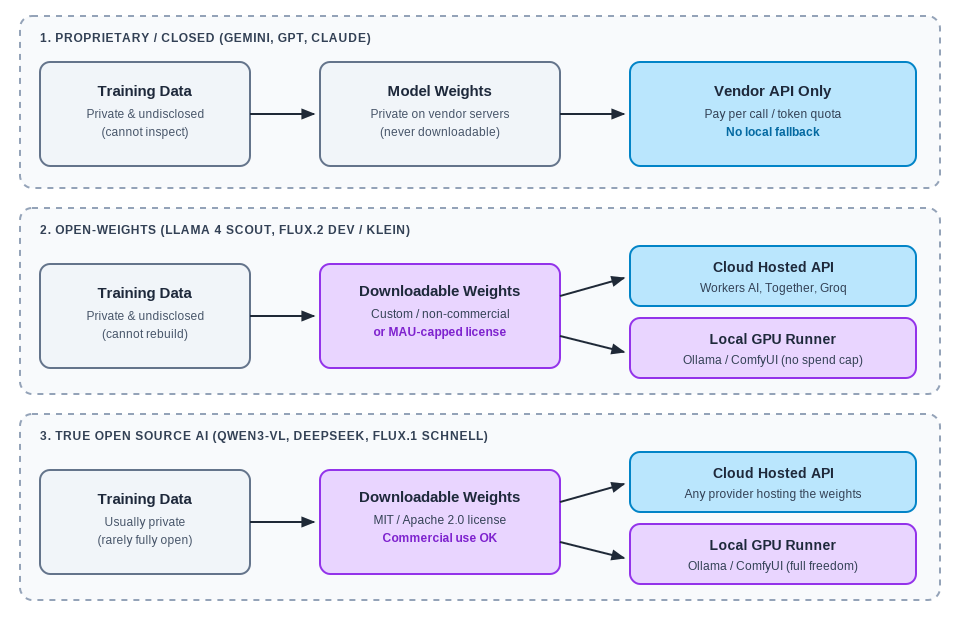
Diagram: How training data, model weights, and execution options differ across the three tiers (Image: endegraaf.nl).
1. Proprietary / Closed (Gemini, GPT, Claude)
- What you get: Access to a hosted API. Training data and weights never leave the vendor's servers.
- Pros: Frontier quality, zero hardware management, fast multimodal features.
- Trade-off: Complete runtime lock-in. You pay per call, obey the vendor's rate limits, and cannot run a local fallback if your spend limit is reached.
2. Open-Weights with Custom Licenses (Llama 4, FLUX.2 [dev] & [klein], Gemma)
- What you get: Downloadable weights you can host on a third-party cloud (like Cloudflare Workers AI) or run on your own GPU.
- Pros: Same model works in the cloud and locally. You can quantize weights (shrink them to 8-bit or 4-bit) to fit on consumer hardware.
- Trade-off: Custom licenses add strings—for example, Meta's Llama Community License caps massive monthly active users, and Black Forest Labs' FLUX.2 [dev]/[klein] weights carry non-commercial or custom terms.
3. True Open Source (Qwen3-VL, DeepSeek-R1/V3, FLUX.1 [schnell])
- What you get: Downloadable weights under an OSI-approved permissive license like MIT or Apache 2.0.
- Pros: Full portability plus clear commercial rights—no user-count ceilings or non-commercial clauses on the weights themselves.
- Trade-off: Training datasets are still usually private, so you're trusting the publisher's pre-trained weights.
| Tier | Example Models | Weights Downloadable? | Commercial License | Local Fallback Possible? |
|---|---|---|---|---|
| Proprietary | Gemini, GPT, Claude | No | Vendor Terms | No |
| Open-Weights | Llama 4 Scout, FLUX.2 [dev]/[klein] | Yes | Custom / Non-Commercial | Yes |
| True Open Source | Qwen3-VL, DeepSeek, FLUX.1 [schnell] | Yes | MIT / Apache 2.0 | Yes |
The Real Takeaway: Local Execution Beats License Purity
When you're building an app, it's tempting to think choosing an Apache 2.0 model automatically saves you from vendor lock-in. It doesn't—not if your app still calls a single cloud provider's SDK directly.
What actually breaks lock-in is architecture + local execution:
1. Put your own /api/* boundary between the app and the model so the frontend never knows which provider is answering.
2. Verify that the workload can run locally (for example, Qwen3-VL in Ollama and FLUX.2 in ComfyUI).
In our own migration (Escaping AI Studio Vendor Lock-In), running locally on a consumer GPU turned out to be both the safety net when cloud spend limits or daily free-tier neuron caps ran out, and the litmus test that proved the app was no longer locked to a single vendor.